Place your originals on the platen glass or into the feeder, depending on the size and type of the original, and the modes that you want to use.
Platen Glass
You should use the platen glass when copying bound originals (such as books and magazines), heavy or lightweight originals, and transparencies.
Feeder
You should use the feeder when you want to copy several originals at the same time. Place the originals into the feeder and press  (Start). The machine automatically feeds the originals to the platen glass and scans them. Two-sided originals can also be automatically turned over and scanned as two-sided documents.
(Start). The machine automatically feeds the originals to the platen glass and scans them. Two-sided originals can also be automatically turned over and scanned as two-sided documents.The size of the original is automatically detected, and the document is scanned. When you are sending fax documents, if the output paper in the recipient's machine is not equal to the scanned document size, the original image may be either reduced in size or divided into smaller parts before it is sent.
The machine cannot always detect the size of the original if it is a nonstandard paper size, such as a book. In this case, specify the size at which you want to scan the original. (See "Specifying/Registering Scan Sizes" (Scan and Send) and "Specifying/Registering Scan Sizes" (Using the Machine to Send/Receive a Fax).)
You can place an original either vertically or horizontally. Always align the top edge of your original with the back edge of the platen glass (by the arrow in the top left corner) or the back edge of the feeder.
Platen Glass
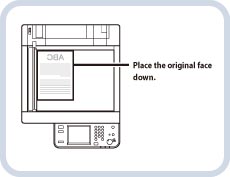
Vertical Placement
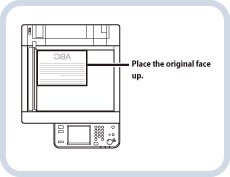
Horizontal Placement
Feeder
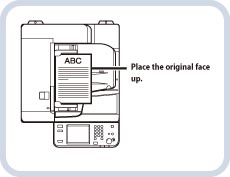
Vertical Placement
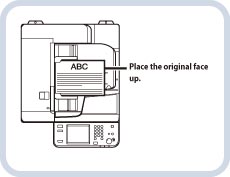
Horizontal Placement
|
NOTE
|
|
If the original has too many pages to be placed in the feeder all at once, use the Job Build mode on the [Options] screen. For more information, see the following:
Job Build for Copy
Job Build for Scan and Store
Job Build for Scan and Send
Job Build for Fax Settings
If the top edge of the original is not aligned with the back edge of the platen glass (by the arrow in the top left corner), your original may not be scanned correctly, depending on the copy mode that you have set.
You can place the originals either vertically or horizontally. However, the scanning speed for horizontally placed originals is somewhat slower than vertically placed originals. Place originals horizontally when scanning with a Preset Zoom, such as when enlarging an LTR original onto 11" x 17" paper.
Horizontally placed LTR and STMT originals are referred to as LTRR and STMTR.
You must place 11" x 17" and LGL originals horizontally.
|