

0WR6-0U9
By combining options, you can use functions more efficiently.
When the Staple Finisher-W1 PRO/Booklet Finisher-W1 PRO is installed
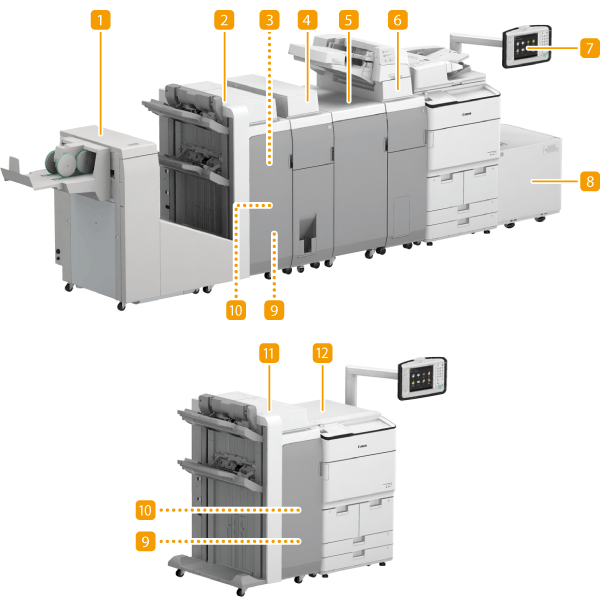
 Booklet Trimmer-D1
If you install the "Booklet Trimmer-D1" in the "Booklet Finisher-W1 PRO," you can cut bound output paper for proper alignment. For detailed information, see the "Booklet Trimmer-D1" user's manual.
 Booklet Finisher-W1 PRO
You can perform collating, grouping, stapling (Corner/Double/Booklet), and saddle folding with this option.Staple Finisher-W1 PRO/Booklet Finisher-W1 PRO/Puncher Unit-BS1/Booklet Trimmer-D1
 Staple-P1(booklet unit staple cartridge)
This option is a staple cartridge for the booklet unit which can be installed in the "Booklet Finisher-W1 PRO." About Replacement Staple Cartridge
 Paper Folding Unit-J1
The "Paper Folding Unit-J1" can be installed in the "Staple Finisher-W1 PRO" or "Booklet Finisher-W1 PRO," and enables you to fold output paper. Paper Folding Unit-J1
 Multi Function Professional Puncher-A1
The "Multi Function Professional Puncher-A1" punches several types of holes. For more information on the "Multi Function Professional Puncher-A1," see the instruction manual of the "Multi Function Professional Puncher-A1."
 Document Insertion Unit-N1
If you install the "Document Insertion Unit-N1," paper different from the original paper can be fed as a cover or insert pages. Document Insertion Unit-N1
 Upright Control Panel-E1
If you install "Upright Control Panel-E1," you can adjust the position and angle so as to easily see the touch panel display. Control Panel
 POD Deck Lite-C1
If you install the "POD Deck Lite-C1" to the machine, you have an additional large-capacity paper deck. POD Deck Lite-C1/Paper Deck Unit-E1
 Puncher Unit-BS1
If you install the "Puncher Unit-BS1" in the "Staple Finisher-W1 PRO" or "Booklet Finisher-W1 PRO," you can punch holes in your printouts. Staple Finisher-W1 PRO/Booklet Finisher-W1 PRO/Puncher Unit-BS1/Booklet Trimmer-D1
 Staple-N1(stapler unit staple cartridge)
This option is a staple cartridge for the stapler unit which can be installed in the "Staple Finisher-W1 PRO" and "Booklet Finisher-W1 PRO." About Replacement Staple Cartridge
 Staple Finisher-W1 PRO
You can perform collating, grouping, and stapling (Corner/Double) with this option. Staple Finisher-W1 PRO/Booklet Finisher-W1 PRO/Puncher Unit-BS1/Booklet Trimmer-D1
 Printer Cover-H1
Install this option if you use the machine as a printer. Printer Cover-H1
When the Staple Finisher-X1/Booklet Finisher-X1 is installed
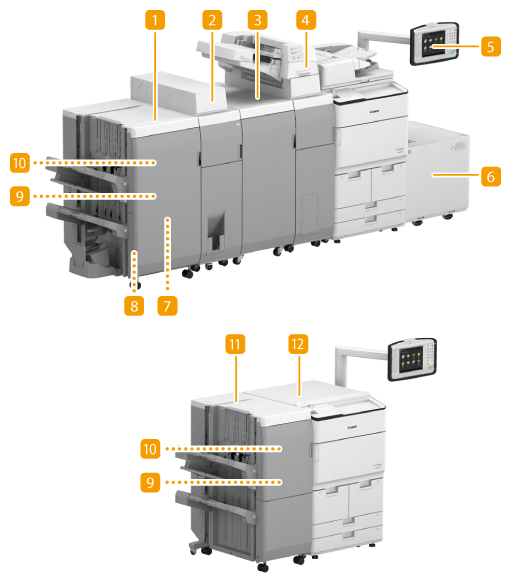 Booklet Finisher-X1
You can perform collating, grouping, stapling (Corner/Double/Booklet), and saddle folding with this option. Staple Finisher-X1/Booklet Finisher-X1/Puncher Unit-BF1/Inner Booklet Trimmer-A1
Paper Folding Unit-J1The "Paper Folding Unit-J1" can be installed in the "Staple Finisher-X1" or "Booklet Finisher-X1," and enables you to fold output paper. Paper Folding Unit-J1
Multi Function Professional Puncher-A1The "Multi Function Professional Puncher-A1" punches several types of holes. For more information on the "Multi Function Professional Puncher-A1," see the instruction manual of the "Multi Function Professional Puncher-A1."
Document Insertion Unit-N1If you install the "Document Insertion Unit-N1," paper different from the original paper can be fed as a cover or insert pages. Document Insertion Unit-N1
Upright Control Panel-E1If you install "Upright Control Panel-E1," you can adjust the position and angle so as to easily see the touch panel display. Control Panel
POD Deck Lite-C1If you install the "POD Deck Lite-C1" to the machine, you have an additional large-capacity paper deck. POD Deck Lite-C1/Paper Deck Unit-E1
Staple-P1(booklet unit staple cartridge)This option is a staple cartridge for the booklet unit which can be installed in the "Booklet Finisher-X1." About Replacement Staple Cartridge
Inner Booklet Trimmer-A1If you install the "Inner Booklet Trimmer-A1" in "Booklet Finisher-X1," you can cut bound output paper for proper alignment. Staple Finisher-X1/Booklet Finisher-X1/Puncher Unit-BF1/Inner Booklet Trimmer-A1
Puncher Unit-BF1If you install the "Puncher Unit-BF1" in "Staple Finisher-X1"or "Booklet Finisher-X1," you can punch holes in your printouts. Staple Finisher-X1/Booklet Finisher-X1/Puncher Unit-BF1/Inner Booklet Trimmer-A1
Staple-N1(stapler unit staple cartridge)This option is a staple cartridge for the stapler unit which is installed in the "Staple Finisher-X1" and "Booklet Finisher-X1." About Replacement Staple Cartridge
Staple Finisher-X1You can perform collating, grouping, and stapling (Corner/Double) with this option. Staple Finisher-X1/Booklet Finisher-X1/Puncher Unit-BF1/Inner Booklet Trimmer-A1
Printer Cover-H1Install this option if you use the machine as a printer. Printer Cover-H1
When the Staple Finisher-V1/Booklet Finisher-V1 is installed
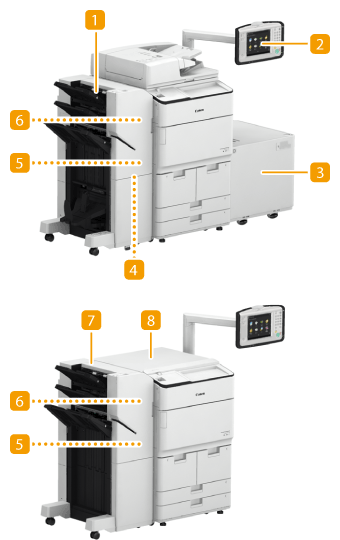 Booklet Finisher-V1
You can perform collating, grouping, stapling (Corner/Double/Booklet), and saddle folding with this option. In addition, you can manually bind with the stapler or bind without the stapler. Staple Finisher-V1/Booklet Finisher-V1/2/3 Hole Puncher Unit-A1
Upright Control Panel-E1If you install "Upright Control Panel-E1," you can adjust the position and angle so as to easily see the touch panel display. Control Panel
POD Deck Lite-C1If you install the "POD Deck Lite-C1" to the machine, you have an additional large-capacity paper deck. POD Deck Lite-C1/Paper Deck Unit-E1
Staple Cartridge-Y1(booklet unit needle case)This option is a staple cartridge for the booklet unit which can be installed in the "Booklet Finisher-V1." About Replacement Staple Cartridge
2/3 Hole Puncher Unit-A1If you install the "2/3 Hole Puncher Unit-A1" in the "Staple Finisher-V1" or "Booklet Finisher-V1," you can punch holes in your printouts. Staple Finisher-V1/Booklet Finisher-V1/2/3 Hole Puncher Unit-A1
Staple Cartridge-X1(stapler unit staple cartridge)This option is a staple cartridge for the stapler unit which can be installed in the "Staple Finisher-V1" and "Booklet Finisher-V1." About Replacement Staple Cartridge
Staple Finisher-V1You can perform collating, grouping, and stapling (Corner/Double) with this option. In addition, you can manually bind with the stapler or bind without the stapler. Staple Finisher-V1/Booklet Finisher-V1/2/3 Hole Puncher Unit-A1
Printer Cover-H1Install this option if you use the machine as a printer. Printer Cover-H1
When Other Options are Installed
 Upright Control Panel-E1
If you install "Upright Control Panel-E1," you can adjust the position and angle so as to easily see the touch panel display. Control Panel
Paper Deck Unit-E1If you install the "Paper Deck Unit-E1" to the machine, you have an additional large-capacity paper deck. POD Deck Lite-C1/Paper Deck Unit-E1
Copy Card Reader-F1You can implement Department ID Management using the card reader. Copy Card Reader-F1
Utility Tray-B1This option provides space for placing documents.
Double Feeding Detection Kit-B1This option detects that multiple sheets are fed together.
Tab Feeding Attachment Kit-B1Attach the "Tab Feeding Attachment Kit-B1" to load tab paper into the paper drawers of the machine. This option can hold only LTR tab paper.
|
NOTE
|
|
For information on the combination of options that can be installed on the machine, contact your local authorized Canon dealer.
|
