

0WR6-0UC
Install the "Staple Finisher-W1 PRO" or "Booklet Finisher-W1 PRO" to use the following finishing functions.
Collate
The printouts are collated into sets arranged in the page order of the document.
Group
All printouts of the same original page are grouped together into sets.
Offset
Each printout group is shifted in alternating layers.
Staple + Collate
The printouts are collated into sets arranged in page order and stapled (Corner/Double). You can fold and staple the printouts by using "Booklet Finisher-W1 PRO."
Staple + Group
All printouts of the same original page are grouped together into sets and stapled (Corner/Double).
Saddle Fold (Booklet Finisher-W1 PRO only)
The printouts are folded into half its size.
The printouts are collated into sets arranged in the page order of the document.
Group
All printouts of the same original page are grouped together into sets.
Offset
Each printout group is shifted in alternating layers.
Staple + Collate
The printouts are collated into sets arranged in page order and stapled (Corner/Double). You can fold and staple the printouts by using "Booklet Finisher-W1 PRO."
Staple + Group
All printouts of the same original page are grouped together into sets and stapled (Corner/Double).
Saddle Fold (Booklet Finisher-W1 PRO only)
The printouts are folded into half its size.
|
TIPS
|
|
If you install the "Puncher Unit-BS1" in the "Staple Finisher-W1 PRO" or "Booklet Finisher-W1 PRO," you can punch holes in your printouts.
If you install the "Booklet Trimmer-D1" in the "Booklet Finisher-W1 PRO," you can cut the bound output paper to align the edge of the paper. For detailed information, see the "Booklet Trimmer-D1" user's manual.
|
External View
 |
|
 |
|
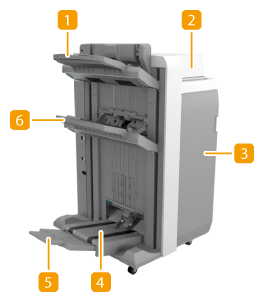
Booklet Finisher-W1 PRO
|
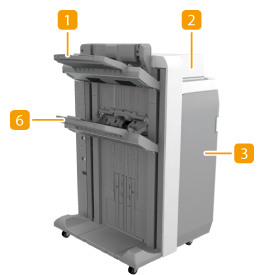
Staple Finisher-W1 PRO
|
 Output Tray A
The prints are output to this tray. You can specify functions for which the tray is used by configuring <Output Tray Settings>. <Paper Output Settings>
 Top cover
Open to remove jammed paper.
 Front cover
Open to remove jammed paper, clear a staple jam in the stapler unit and saddle stitcher unit, or replace the staple cartridge. If the "Puncher Unit-BS1" is installed, open to discard punch waste.
 Booklet tray (Booklet Finisher-W1 PRO only)
The printouts that are saddle stitched are output to this tray.
 Auxiliary Booklet Tray (Booklet Finisher-W1 PRO only)
Adjust to the paper to be output on the booklet tray.
 Output Tray B
The prints are output to this tray. You can specify functions for which the tray is used by configuring <Output Tray Settings>. <Paper Output Settings>
|
NOTE
|
|
Output Tray A and B align output paper with their two alignment guides. You can adjust the position of these guides. For more information, <Adjust Action>
 <Finisher Tray A Alignment Adjustment>/<Finisher Tray B Alignment Adjustment>. <Finisher Tray A Alignment Adjustment>/<Finisher Tray B Alignment Adjustment>. |
Internal View
 |
|
 |
|
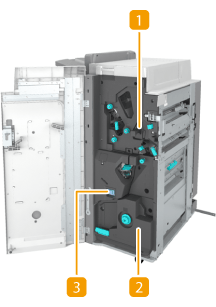
Booklet Finisher-W1 PRO
|
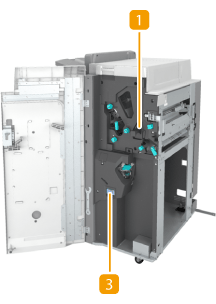
Staple Finisher-W1 PRO
|
Punch waste tray (Puncher Unit-BS1)Pull out to discard punch waste. Discarding Punch Waste (Staple Finisher-W1 PRO/Booklet Finisher-W1 PRO)
Saddle stitcher unit (Booklet Finisher-W1 PRO only)Pull out to remove jammed paper or clear a staple jam in the saddle stitcher unit, or to replace the staple cartridge.
Staple waste trayPull out to discard stapler waste. Discarding Staple Waste (Staple Finisher-W1 PRO/Booklet Finisher-W1 PRO)
|
NOTE
|
|
For information on the paper sizes that can be used for Staple, Saddle Stitch, Hole Punch, and Saddle Fold, see Specifications.
To replace the staple cartridge of the stapler unit or saddle stitcher unit, see Replacing the Staple Cartridge.
For how to clear a paper jam or a staple jam, see Clearing Paper Jams Clearing Staple Jams.
Collate and group
If you select <Offset> in combination with the collate or group function, each printout group is shifted.
The output trays move downward as the output paper stacks accumulate. Once an output tray has reached its stacking limit, subsequent prints are automatically delivered to the next available tray. If all of the available trays have reached their stacking limits, printing stops. Remove all of the output paper from the trays to resume printing.
Staplers
When you are using the Staple mode, do not remove the stack of paper from the output tray during the job. Remove the stack of paper when the job has been completed.
If the <Load staples into the stapler unit.> message appears, almost all of the staples have been used. To proceed, replace the staple cartridge.
If a tray reaches the lowest position limit, printing stops temporarily. Remove all of the output paper from the tray to resume printing.
Saddle stitch
The accuracy of folds may vary depending on the paper type and the number of sheets.
|
