 |
|
 (Start). The machine automatically feeds the originals to the platen glass and scans them. Two-sided originals can also be automatically turned over and scanned as two-sided documents.
 |
 |
|
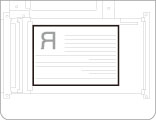
Place the original face down.
|
|
|
Original in Portrait Orientation
|
Original in Landscape Orientation
|
 |
 |
|
Place the original face up.
|
|
|
Original in Portrait Orientation
|
Original in Landscape Orientation
|
|
NOTE
|
|
Set the orientation of the placed original in [Options].
Specifying the Orientation of the Original Image for Scan and Store
Specifying the Orientation of the Original Image for Scan and Send
Place originals such as STMT horizontally, even if the scanning area of the platen glass or feeder fully covers the size of vertically-placed originals. When placing your originals vertically, select [Portrait] for [Orig. Content Orientation].
By selecting [Auto (LTR/LGL)] for [Select Paper], scanning may be slightly slower than when selecting either [LTR] or [LGL].
|
