






| Collating Copies |
|
The Finishing modes can be selected to collate the outputs in various ways, either by pages or copy sets. For information on the optional products required to use this function, see "Optional Products (imageRUNNER ADVANCE C9075 PRO/C9065 PRO)" or "Optional Products (imageRUNNER ADVANCE C7065/C7055)." |
| Remark |
|
|
|||||
|
| Optional Unit | Offset | Rotate 90 Degrees | Staple | Hole Punch | Fold | Trim | Face Up/ Down Setting |
||
| Corner | Double | Saddle Stitch | |||||||
| None | - |  LTR, LTRR |
- | - | - | - | - | - | |
| Copy Tray-P1 | - | LTR, LTRR |
- | - | - | - | - | - | |
| Staple Finisher-A1 | 11" × 17", LGL, LTR, LTRR, EXEC |
- | LTR, EXEC (100 sheets*1) 11" × 17", LGL, LTRR (50 sheets) |
LTR, EXEC (100 sheets*1) 11" × 17", LGL, LTRR (50 sheets) |
- | - | - | - | |
| Staple Finisher-A1 and Puncher Unit-BF1 |
11" × 17", LGL, LTR, LTRR, EXEC |
- | LTR, EXEC (100 sheets*1) 11" × 17", LGL, LTRR (50 sheets) |
LTR, EXEC (100 sheets*1) 11" × 17", LGL, LTRR (50 sheets) |
- | 11" × 17", LGL, LTR, LTRR, EXEC |
- | - | |
| Staple Finisher-A1, Professional Puncher-C1, and Professional Puncher Integration Unit-B1 |
11" × 17", LGL, LTR, LTRR, EXEC |
- | LTR, EXEC (100 sheets*1) 11" × 17", LGL, LTRR (50 sheets) |
LTR, EXEC (100 sheets*1) 11" × 17", LGL, LTRR (50 sheets) |
- | LTR |
- | - | |
| Staple Finisher-A1 and Paper Folding Unit-G1 |
11" × 17", LGL, LTR, LTRR, EXEC |
- | LTR, EXEC (100 sheets*1) 11" × 17", LGL, LTRR (50 sheets) |
LTR, EXEC (100 sheets*1) 11" × 17", LGL, LTRR (50 sheets) |
- | - | Z-Fold: 11" × 17", LGL, LTRR C-Fold/ Half Fold/ Accordion Z-Fold: LTRR Double Parallel Fold: LGL, LTRR |
- | |
| Staple Finisher-B1 | 11" × 17", LGL, LTR, LTRR, EXEC |
- | 11" × 17", LGL, LTRR (30 sheets) LTR, EXEC (50 sheets) |
11" × 17", LGL, LTRR (30 sheets) LTR, EXEC (50 sheets) |
- | - | - | - | |
| Staple Finisher-B1 and External 2/3 Hole Puncher-A1 |
11" × 17", LGL, LTR, LTRR, EXEC |
- | 11" × 17", LGL, LTRR (30 sheets) LTR, EXEC (50 sheets) |
11" × 17", LGL, LTRR (30 sheets) LTR, EXEC (50 sheets) |
- | 11" × 17", LGL, LTR, LTRR |
- | - | |
| Staple Finisher-B1 and Document Insertion / Folding Unit-G1 |
11" × 17", LGL, LTR, LTRR, EXEC |
- | 11" × 17", LGL, LTRR (30 sheets) LTR, EXEC (50 sheets) |
11" × 17", LGL, LTRR (30 sheets) LTR, EXEC (50 sheets) |
- | - | Z-Fold: 11" × 17", LGL, LTRR C-Fold: LTRR Double Parallel Fold: LGL, LTRR |
- | |
| Booklet Finisher-A1 | 11" × 17", LGL, LTR, LTRR, EXEC |
- | LTR, EXEC (100 sheets*1) 11" × 17", LGL, LTRR (50 sheets) |
LTR, EXEC (100 sheets*1) 11" × 17", LGL, LTRR (50 sheets) |
12 5/8" × 17 11/16", 12" × 18", 11" × 17", LGL, LTRR (25 sheets) |
- | Saddle-Fold: 13" × 19", 12 5/8" × 17 11/16", 12" × 18", 11" × 17", LGL, LTRR |
- | |
| Booklet Finisher-A1 and Puncher Unit-BF1 |
11" × 17", LGL, LTR, LTRR, EXEC |
- | LTR, EXEC (100 sheets*1) 11" × 17", LGL, LTRR (50 sheets) |
LTR, EXEC (100 sheets*1) 11" × 17", LGL, LTRR (50 sheets) |
12 5/8" × 17 11/16", 12" × 18", 11" × 17", LGL, LTRR (25 sheets) |
11" × 17", LGL, LTR, LTRR, EXEC |
Saddle-Fold: 13" × 19", 12 5/8" × 17 11/16", 12" × 18", 11" × 17", LGL, LTRR |
- | |
| Booklet Finisher-A1, Professional Puncher-C1, and Professional Puncher Integration Unit-B1 |
11" × 17", LGL, LTR, LTRR, EXEC |
- | LTR, EXEC (100 sheets*1) 11" × 17", LGL, LTRR (50 sheets) |
LTR, EXEC (100 sheets*1) 11" × 17", LGL, LTRR (50 sheets) |
12 5/8" × 17 11/16", 12" × 18", 11" × 17", LGL, LTRR (25 sheets) |
LTR |
Saddle-Fold: 13" × 19", 12 5/8" × 17 11/16", 12" × 18", 11" × 17", LGL, LTRR |
- | |
| Booklet Finisher-A1 and Paper Folding Unit-G1 |
11" × 17", LGL, LTR, LTRR, EXEC |
- | LTR, EXEC (100 sheets*1) 11" × 17", LGL, LTRR (50 sheets) |
LTR, EXEC (100 sheets*1) 11" × 17", LGL, LTRR (50 sheets) |
12 5/8" × 17 11/16", 12" × 18", 11" × 17", LGL, LTRR (25 sheets) |
- | Z-Fold: 11" × 17", LGL, LTRR Saddle-Fold: 13" × 19", 12 5/8" × 17 11/16", 12" × 18", 11" × 17", LGL, LTRR C-Fold/ Half Fold/ Accordion Z-Fold: LTRR Double Parallel Fold: LGL, LTRR |
- | |
| Booklet Finisher-A1 and Inner Booklet Trimmer-A1 |
11" × 17", LGL, LTR, LTRR, EXEC |
- | LTR, EXEC (100 sheets*1) 11" × 17", LGL, LTRR (50 sheets) |
LTR, EXEC (100 sheets*1) 11" × 17", LGL, LTRR (50 sheets) |
12 5/8" × 17 11/16", 12" × 18", 11" × 17", LGL, LTRR (25 sheets) |
- | Saddle-Fold: 13" × 19", 12 5/8" × 17 11/16", 12" × 18", 11" × 17", LGL, LTRR |
11" × 17", LGL, LTR, LTRR |
|
| Booklet Finisher-B1 | 11" × 17", LGL, LTR, LTRR, EXEC |
- | 11" × 17", LGL, LTRR (30 sheets) LTR, EXEC (50 sheets) |
11" × 17", LGL, LTRR (30 sheets) LTR, EXEC (50 sheets) |
12" × 18", 11" × 17", LGL, LTRR (16 sheets) |
- | Saddle-Fold: 12" × 18", 11" × 17", LGL, LTRR |
- | |
| Booklet Finisher-B1 and External 2/3 Hole Puncher-A1 |
11" × 17", LGL, LTR, LTRR, EXEC |
- | 11" × 17", LGL, LTRR (30 sheets) LTR, EXEC (50 sheets) |
11" × 17", LGL, LTRR (30 sheets) LTR, EXEC (50 sheets) |
12" × 18", 11" × 17", LGL, LTRR (16 sheets) |
11" × 17", LGL, LTR, LTRR |
Saddle-Fold: 12" × 18", 11" × 17", LGL, LTRR |
- | |
| Booklet Finisher-B1 and Document Insersion / Folding Unit-G1 |
11" × 17", LGL, LTR, LTRR, EXEC |
- | 11" × 17", LGL, LTRR (30 sheets) LTR, EXEC (50 sheets) |
11" × 17", LGL, LTRR (30 sheets) LTR, EXEC (50 sheets) |
12" × 18", 11" × 17", LGL, LTRR (16 sheets) |
- | Saddle-Fold: 12" × 18", 11" × 17", LGL, LTRR Z-Fold: 11" × 17", LGL, LTRR C-Fold: LTRR |
- | |
| *1 | If both the Staple Cartridge-H1 and Staple-H1 are attached, the sheets cannot be stapled when the total number of sheets exceeds 50. |
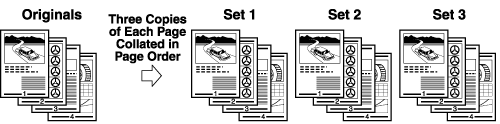
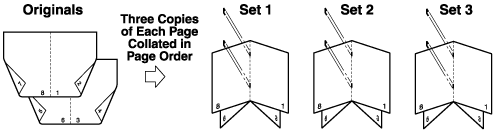
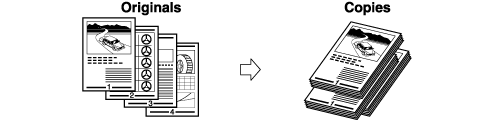
The copies are automatically collated into sets arranged in page order. The output is as follows:
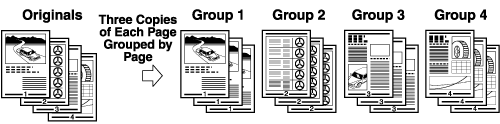
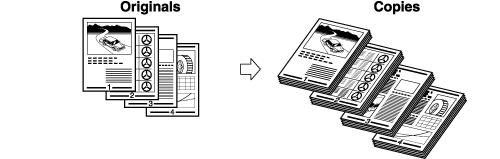
All copies of the same original page are grouped together. The output is as follows:
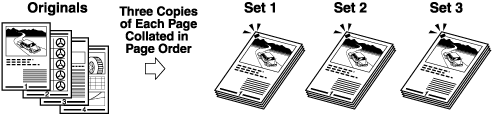
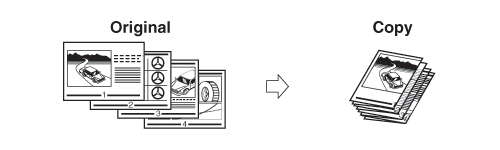
The copies are automatically collated into sets arranged in page order and stapled. The output is as follows:
|
| Remark |
|
|
|||||
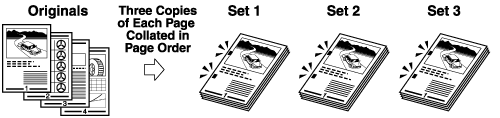
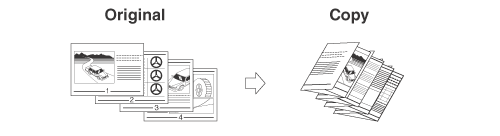
If the Collate, Group, and Staple modes are not set, copies are output as follows:
The machine punches two or three holes in the output.
|

| Remark |
|
||||||
The output is described below.
The machine Z-folds 11"×17" paper into LTR size, respectively.
|

The LTRR paper is folded three times in a C-fold.
|
| Remark |
|
||||||
The machine folds LTRR paper into STMT size.
The LTRR paper is folded outward three times.
|
| Remark |
|
||||||
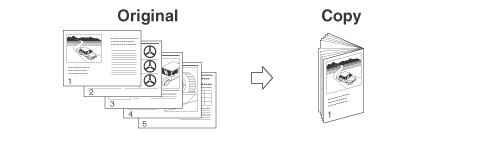
The machine folds a paper, such as 11"×17" and LTRR, into half of its size.
|
| Remark |
|
|
|||||
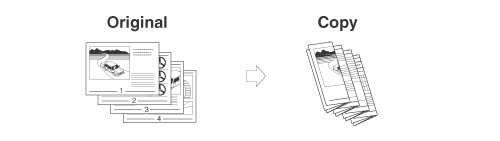
The LGL/LTRR paper is folded outward 4 times.
|
| Remark |
|
||||||
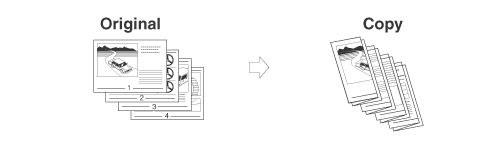
If the copies are of the same size, the sheets are automatically collated into sets arranged in page order, and are output in alternating directions as follows:
The copies are slightly offset vertically in the output tray as follows: (You can also specify the number of copy sets to offset.)
You can specify whether the printed sheets are face up or face down, press [Face Up/Face Down] and select from the following:
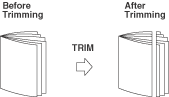
The edges of Saddle Stitched sheets are trimmed.
|
||||||||||||||||||||||||||||

| Remark |
|
||||||
| Page Order (Collate) |
| Same Page (Group) |
| Page Order (Staple) |