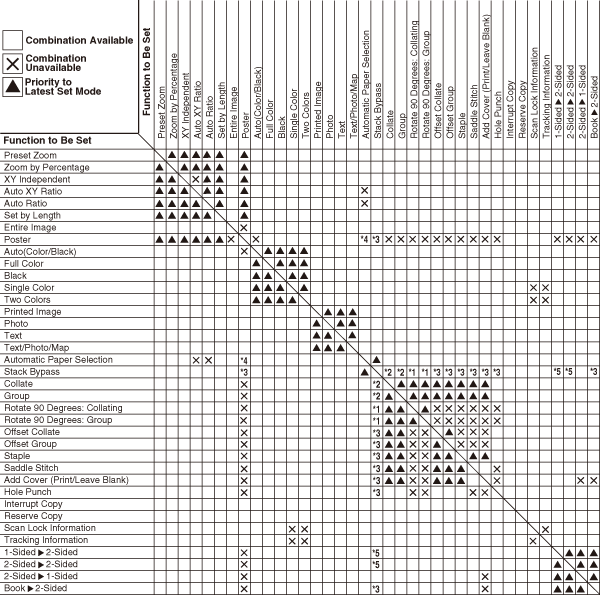
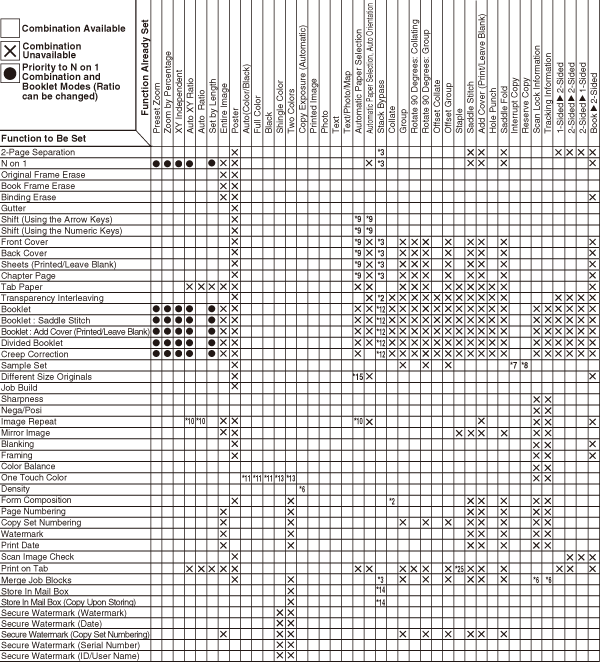
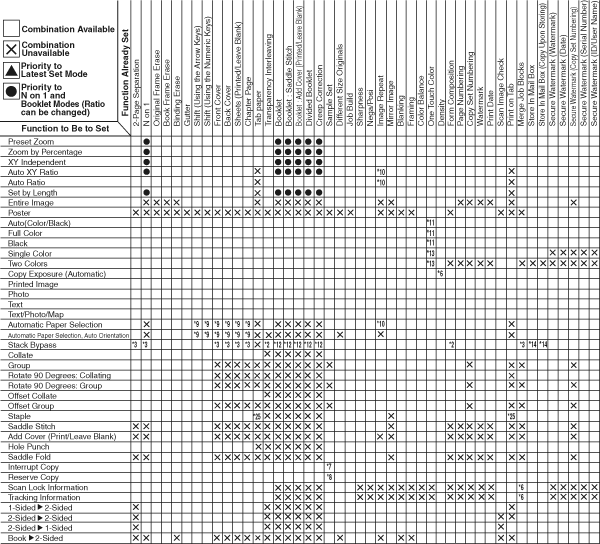
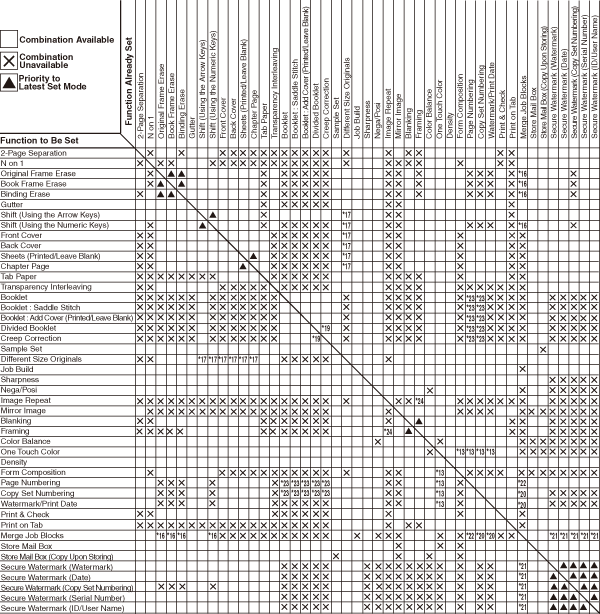
| *1 |
You cannot combine these modes if you select a paper type and size other than plain, recycled, color, and heavy 1 types of LTR and LTRR. |
| *2 |
You cannot combine these modes when envelope is selected. |
| *3 |
You cannot combine these modes when a Custom Size or envelope is selected. |
| *4 |
You can set these modes in combination with the Poster (Copy Ratio) mode. |
| *5 |
You cannot combine these modes when an envelope or Custom Size (of a size other than 4" × 5 7/8" to 13" × 19 1/4" (100 mm × 148 mm to 330.2 mm × 487.7 mm)) is selected. |
| *18 |
You cannot combine these modes with the Secure Watermark (Copy Set Numbering) mode. |
| *2 |
You cannot combine these modes when envelope is selected. |
| *3 |
You cannot combine these modes when you select a Custom Size or envelope as the paper type. |
| *6 |
You cannot combine these modes with the Secure Watermark, Page Numbering, Copy Set Numbering, Watermark, and Print Date modes in the Job Block Combination mode.
|
| *7 |
You can set the Sample Set mode as the Interrupt mode. |
| *8 |
You can set the Sample Set mode as the reserve copy mode. |
| *9 |
You cannot combine these modes when you set the Different Size Originals mode. |
| *10 |
You can set these modes in combination with the Image Repeat (manual setting). |
| *11 |
If you select the Sepia Tone mode in combination with these modes, the mode which is set last has priority (Priority to Latest Set Mode). |
| *12 |
You cannot combine these modes when you set the 2nd Side of 2-Sided Page mode and a Custom Size or envelope is selected as the paper type. |
| *13 |
You cannot combine these modes when you set the Sepia Tone mode. |
| *14 |
You cannot combine these modes when a Custom Size is selected. |
| *15 |
You cannot combine these modes when you set the Shift or Cover/Insert Sheets mode. |
| *25 |
You cannot specify the Staple mode for Top Right Corner, Bottom Right Corner, or Right Double stapling in combination. |
| *2 |
You cannot combine these modes when envelope is selected |
| *3 |
You cannot combine these modes when you select a Custom Size or envelope as the paper type. |
| *6 |
You cannot combine these modes with the Secure Watermark, Page Numbering, Copy Set Numbering, Watermark, and Print Date modes in the Job Block Combination mode.
|
| *7 |
You can set the Sample Set mode as the Interrupt mode.
|
| *8 |
You can set the Sample Set mode as the reserve copy mode. |
| *9 |
You cannot combine these modes when you set the Different Size Originals mode. |
| *10 |
You can set these modes in combination with the Image Repeat (manual setting). |
| *11 |
If you select the Sepia Tone mode in combination with these modes, the mode which is set last has priority (Priority to Latest Set Mode). |
| *12 |
You cannot combine these modes when you set the 2nd Side of 2-Sided Page mode and a Custom Size or envelope is selected as the paper type. |
| *13 |
You cannot combine these modes when you set the Sepia Tone mode. |
| *14 |
You cannot combine these modes when a Custom Size is selected. |
| *25 |
You cannot specify the Staple mode for Top Right Corner, Bottom Right Corner, or Right Double stapling in combination. |
| *13 |
You cannot combine these modes when you set the Sepia Tone mode. |
| *16 |
You cannot combine these modes with the Secure Watermark (Copy Set Numbering), Copy Set Numbering, Watermark, and Print Date modes in the Merge Job Blocks mode. |
| *17 |
You cannot combine these modes when the Automatic Paper Selection mode is set. |
| *19 |
Combination available if [Auto] is selected for the Creep Correction mode. |
| *20 |
You cannot combine these modes with the Secure Watermark and Document Scan Lock modes in the Job Block Combination mode. |
| *21 |
You cannot combine the Document Scan Lock, Copy Set Numbering, Watermark, and Print Date modes. |
| *22 |
You cannot combine these modes with the Document Scan Lock mode in the Job Block Combination mode. |
| *23 |
You cannot combine these modes when the Booklet (Do Not Booklet Scan) mode is set. |
| *24 |
You cannot combine these modes when vertical entry is set. |