MEAP > Uninstalling Applications
*
Uninstalling Applications

You can uninstall MEAP applications.


Remark
  • If "Not Installed" is displayed for the status of an application license, the application can be uninstalled. If something other than "Not Installed" is displayed for the status of the application license, the application can be uninstalled after disabling and deleting the license file. (See "Disabling License Files." and "Downloading/Deleting Disabled License Files.")

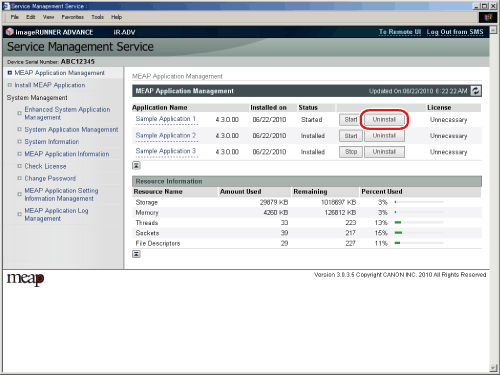
  1. Click [MEAP Application Management].

The [MEAP Application Management] page is displayed.

  1. Click [Uninstall] for the application to uninstall.

When you cannot uninstall the selected application, [Uninstall] is grayed out and cannot be clicked.

  1. Click [Yes].

The application is uninstalled.

  • If you want to uninstall an application that is used with another application, the following confirmation message may be displayed. "A package exported from this application cannot be used." If you uninstall the application that displayed this message, you may not be able to use other applications.
  • If you uninstall an application, it may be necessary to restart the machine to enable the driver settings of a USB device. Follow the instructions on the screen to restart the machine.

  • Back To Top