MEAP > Application License Settings > Downloading/Deleting Disabled License Files

*
Downloading/Deleting Disabled License Files

Return to Overview


You can download or delete disabled license file. If you want to uninstall an application, you must first delete the license file. Also, if you want to back up before deleting, download the license file on the computer and store.


Remark
  • Once you have deleted the disabled license file, you cannot download it from the machine.
  • The disabled license file can be reinstalled to the same machine.
  • You can only download or delete disabled license files.
  • To delete a license file, depending on the license file, it may be necessary to download the file after disabling it.

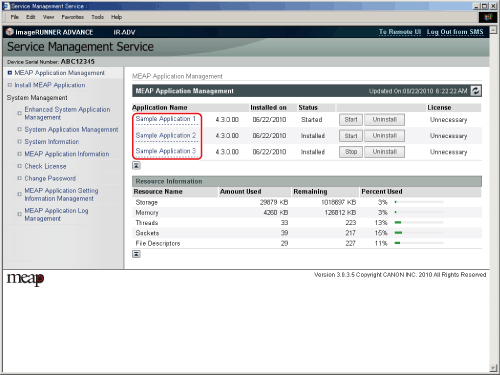
  1. Click [MEAP Application Management].

The [MEAP Application Management] page is displayed.

  1. Click the name of the application to download or delete the license file for.

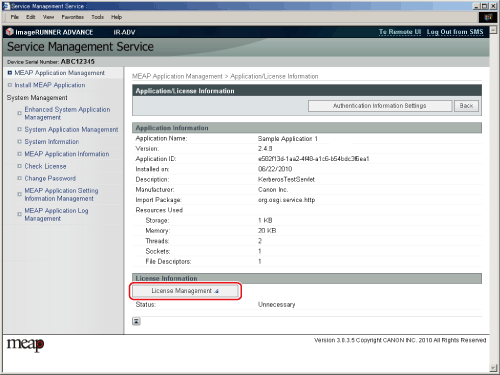
The [Application/License Information] page is displayed.

  1. Click [License Management].

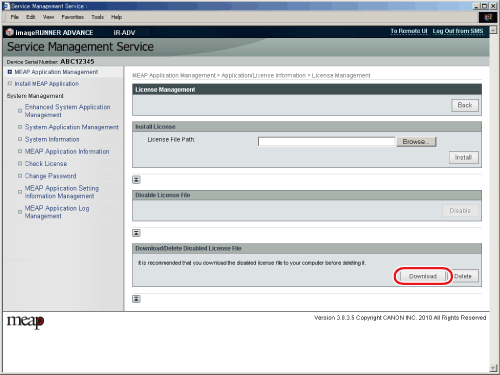
The [License Management] page is displayed.

  • To download the license file:
  • To delete the license file:

  • To download the license file:
  • Select [Download].

  • Specify the location where you want to save the license file.
  • Click [OK].

The license file is stored.


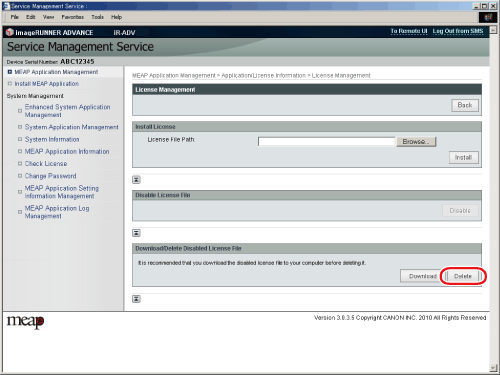
  • To delete the license file:
  • Select [Delete].

The dialog box confirming whether you want to delete the file is displayed.

  • Click [Yes].

The license file is deleted and the display returns to the [License Management] page.


  • Back To Top