MEAP > Application License Settings > Disabling License Files

*
Disabling License Files

Return to Overview


You can disable installed license files. You must disable a license file before deleting or downloading it.


Remark
  • Disabling a license file must be performed after closing the application you want to disable. You cannot disable a license file if the application is still running.
  • When a disabled license file is generated, the status of that license file becomes [Uninstalled] and the application becomes unusable.
  • The disabled license file can be reinstalled to the same machine.

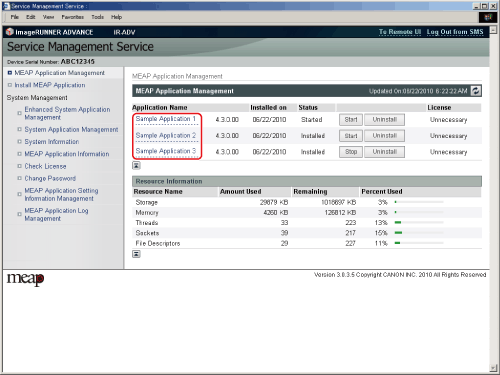
  1. Click [MEAP Application Management].

The [MEAP Application Management] page is displayed.

  1. Click the name of the application to disable the license file for.

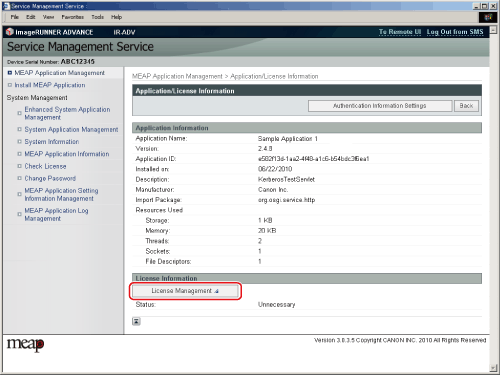
The [Application/License Information] page is displayed.

  1. Click [License Management].

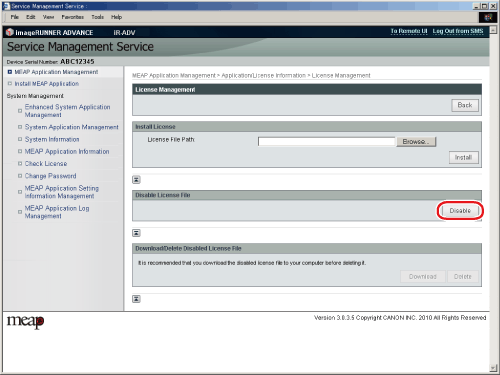
The [License Management] page is displayed.

  1. Click [Disable].

  1. Click [Yes].

  • Back To Top