Copy > Adjusting the Color > Storing Color Balance Settings

*
Storing Color Balance Settings

Return to Overview


You can store color balance settings and then recall them for future use. Up to four different settings can be stored.


  1. Press [Options] → [Color Balance].
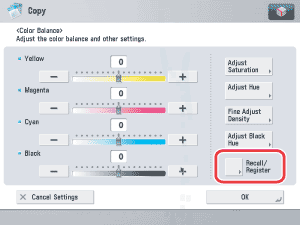
  1. Specify the color balance, saturation, hue, and density settings that you want to store → press [Recall/Register].

For instructions on adjusting the color balance, see "Adjusting the Color Balance."

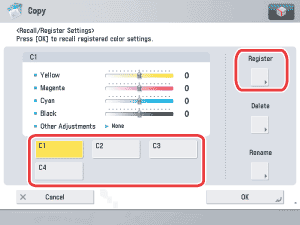
  1. Select a key ([C1] to [C4]) for storing the color balance settings → press [Register].

  • If you select a key that already has settings stored in it, the settings are displayed.
  • If you select a key without settings:
  • If you select a key that already has settings stored in it:

  • If you select a key without settings:
  • A screen appears, asking for your confirmation to store the settings. Press [Yes].

  • If you select a key that already has settings stored in it:
  • A screen appears, asking for your confirmation to overwrite the previous settings. Press [Yes].

  1. Press [Stop] → [Stop].

  • Back To Top