
|
|
If you want to use the printer with optional accessories installed, install them before installing the printer.
|
Carrying the Printer to the Installation Site
1
Pull out the drawer.

2
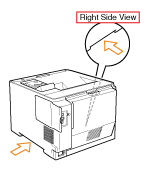
Carry the printer unit to the installation site.
Carry the printer with two or more people by holding the lift handles on the lower portion of the printer and lifting it up at the same time.

3
Insert the drawer in the printer.
Push it in the printer firmly.
1
Connect the power cord.

|
NOTE
|
|
The form of the supplied power cord
The form of the supplied power cord may differ from the one in the above illustration.
|
2
Press the power switch to turn the printer ON.
|
→
|
The indicators and display on the control panel come on, and the printer initiates a self-diagnostic test on the printer unit and optional accessories.
|

If no abnormality is found during the self-diagnostic test, the Main Power indicator (green), (Ready) indicator (green),
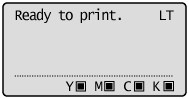
 (Online) indicator (green) and Paper Source indicator (green) come on, <Ready to print.> appears in the display, and the printer is ready to print.
(Ready) indicator (green),(Online) indicator (green) and Paper Source indicator (green) come on, <Ready to print.> appears in the display, and the printer is ready to print. 
The following information is displayed in the display.
|
Next, perform the following procedures.
|