Registering Free Size Paper (Custom Size Paper)
You can register up to five frequently used free sizes of paper. The paper sizes registered here are displayed on the paper size selection screen for the paper drawer and multi-purpose tray (Specifying Paper Size and Type in the Paper Drawer or Specifying Paper Size and Type in the Multi-purpose Tray).
1
Press  .
.
.2
Press <Preferences>  <Paper Settings> <Register Custom Size>.
<Paper Settings> <Register Custom Size>.3
Select a button from <S1> to <S5> and press <Register/Edit>.
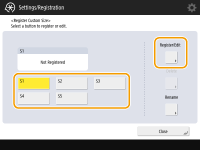
 To change a setting
|
1
|
Select the button you want to change.
|
|
2
|
Press <Register/Edit> and proceed to step 4.
|
To delete a setting
|
1
|
Select the button you want to delete.
|
|
2
|
Press <Delete>
<Yes>. |
To change the registered name
|
1
|
Select the button you want to change.
|
|
2
|
Press <Rename>.
|
|
3
|
Enter a new name and press <OK>.
|
4
Set the paper size.

Specify the length of the <X> side and <Y> side. Press <X> or <Y> to enter the length of each side using the numeric keys.
5
Press <OK>.