Print > Setting the Machine (PS/PCL/UFR II Printer) > Procedure for Checking and Changing Jobs > Checking Jobs from the Secured Print Screen
*
Checking Jobs from the Secured Print Screen

Return to Overview


If you press [My Job Status] or [Job Status] in the Secured Print screen, you can check print job status. If you press [Log], you can check the jobs that have already been processed.
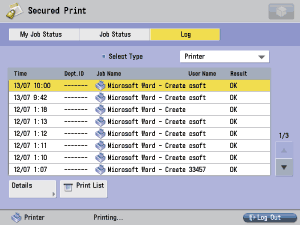

  1. Press [My Job Status], [Job Status], or [Log] to display the current machine status.
  • If you press [My Job Status]:
  • If you press [Job Status]:
  • If you press [Log]:

  • If you press [My Job Status]:
  • The My Job Status screen is displayed if you are using a login service. Since only jobs for a user logged in to this machine will be displayed in the job list, you can block other users from accessing the job names or documents to prevent the flow of information from the machine. For instructions on a login service, see "MEAP."
  • You can check only the logged-in user jobs currently being processed or waiting to be processed.


  • If you press [Job Status]:
  • You can check all the jobs currently being processed or waiting to be processed.


  • If you press [Log]:
  • You can check the jobs that have already been processed.


  • Secured print jobs (including encrypted secured jobs) other than for a logged-in user are displayed as asterisks (*) and cannot be handled unless you are using a login service. However, if you are logged in as an Administrator, you can perform any operation other than printing.

  • You can change or cancel multiple jobs selected from the list. If you select multiple jobs, they are numbered in the order selected.
  • If you press [Select All], you can select all the jobs. If you press [Clear Selection], any selected jobs are cleared.
  • For instructions on canceling jobs or printing secured print jobs, see "Checking and Changing Print Jobs."
  • For instructions on changing the priority of jobs in the print queue or checking the details of a job, see "Before You Start Using This Machine."

  • Back To Top





