 |
|
 (Settings/Registration).
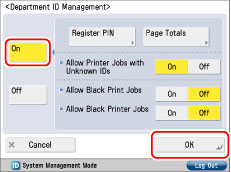 (Settings/Registration).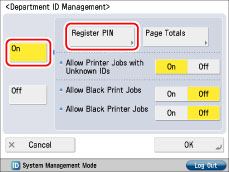
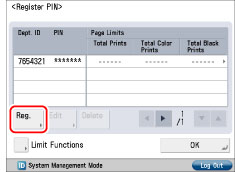
 -
-  (numeric keys).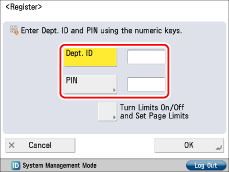
|
NOTE
|
|
You can clear incorrect values by pressing
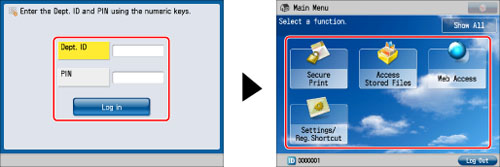
 (Clear). (Clear).If you do not set a PIN, you can use the machine by entering only the Department ID.
|
|
NOTE
|
|
The number of sides refers to the number of printed sides. Therefore, the number of sides of a two-sided print is counted as two. The page limit refers to the maximum number of printed sides.
|
|
NOTE
|
|
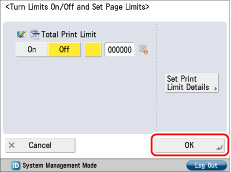
Total Print Limit is the sum of Total Color Print Limit and Total Black Print Limit.
|
 (Page Limit) next to [On]/[Off] of the desired function(s). - (numeric keys).
 |
IMPORTANT
|
|
If the color or black (grayscale) page limit is reached when [Auto (Color/Black)] or [Auto (Color/Gray)] is set for [Select Color], you cannot perform any operations.
The machine stops printing if any one of the color or black-and-white page limits is reached while printing a document that contains both color and black-and-white areas.
|
|
NOTE
|
|
You can clear incorrect values by pressing
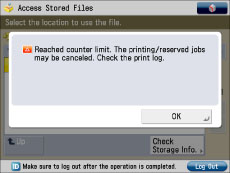
(Clear).You can set the page limit from 0 to 999,999 pages. Once the page limit is reached, printing is not possible. When the page limit is reached, the following screen appears.
When printing:
 |
 (Settings/Registration).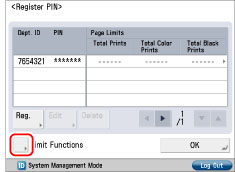
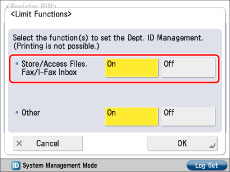
|
[Store/Access Files, Fax/I-Fax Inbox]:
|
 |
|
[Other]:
|
 |
|
NOTE
|
|
If [Department ID Management] is set to [On], functions other than described above and MEAP applications operate as explained below regardless of limit function settings.
The following functions and MEAP application are limited to use.
 |
|
NOTE
|
|
The Count Left only appears for functions with their limit set to 'On'.
On the Print Settings screen, the two items with the lowest Count Left appear. However, if the Total Print Limit is the lowest, only the Total Print Limit appears.
|
(Settings/Registration).  or
or  to display the department whose PIN you want to change → select the department → press [Edit].
 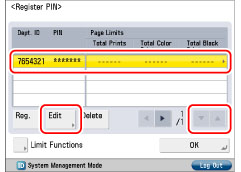 or , you can scroll quickly and continuously backward or forward through the available Department ID pages. When the desired page is displayed, release the keys. Continuous scrolling is useful when a large number of Department IDs are registered. - (numeric keys).
 |
NOTE
|
|
You can clear incorrect values by pressing
(Clear). You cannot change the Department ID.
|
|
NOTE
|
|
You can clear incorrect values by pressing
(Clear).You can set the page limit from 0 to 999,999 pages. Once the page limit is reached, printing is not possible.
The number of sides refers to the number of printed sides. Therefore, the number of sides of a two-sided print is counted as two. The page limit refers to the maximum number of printed sides.
|
(Settings/Registration). or to display the department you want to delete → select the department → press [Delete]. 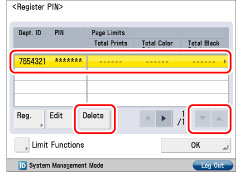
|
NOTE
|
|
By holding down
or , you can scroll quickly and continuously backward or forward through the available Department ID pages. When the desired page is displayed, release the keys. Continuous scrolling is useful when a large number of Department IDs are registered. |
