

0WR6-0R9
Check the location of the paper jam on the touch panel display, and remove it. Paper jam locations are indicated by numbers such as F-A1 or F-B1, which are shown in the illustration below. The Staple Finisher-X1 is optional. Optional Equipment
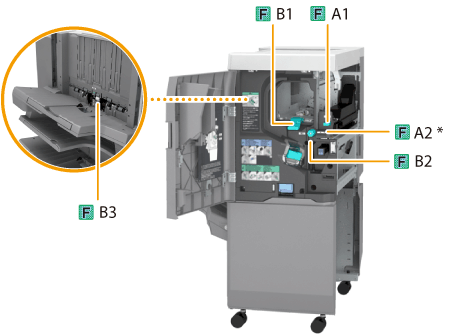
* Entrance guide
1
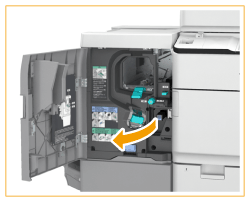
Open the front cover of the finisher.
2
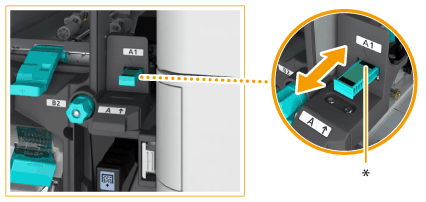
If the Puncher Unit-BF1 is attached, slide the guide (F-A1) to align it with the mark.
|
* Slide the guide in or out to align the nearest
 with the mark ( with the mark ( ). ). |
3
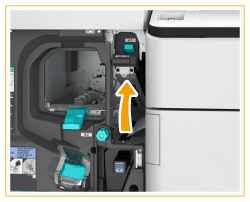
Open the guide (F-A2).
4
Remove the jammed paper.
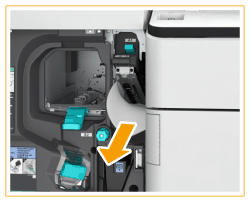 |
 |
Remove the jammed paper.
|
 |
Close the guide (F-A2).
|
5
Open the guide (F-B1).
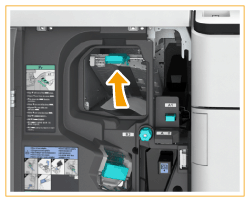
6
Remove the jammed paper.
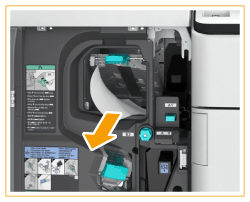 |
|
Remove the jammed paper.
|
|
|
Close the guide (F-B1).
|
7
Turn the dial (F-B2) in the direction of the arrow.
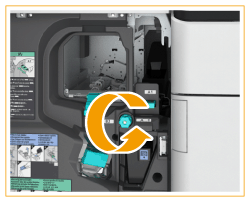
8
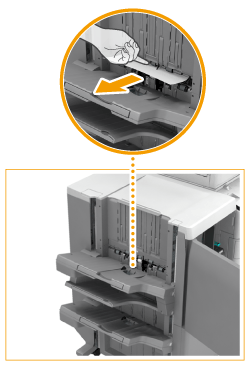
Remove the jammed paper from the guide (F-B3).
 |
|
Open the guide (F-B3).
|
|
|
Remove the jammed paper.
|
|
 |
Close the guide (F-B3).
|
9
Close the front cover of the finisher.
10
Follow the instructions on the touch panel display.
Resume the procedure that was interrupted.
