

0WR6-0LR
You can adjust the paper alignment when outputting paper to the finisher tray if you are using the optional Staple Finisher-W1 PRO/Booklet Finisher-W1 PRO.
1
Press 
 <Adjustment/Maintenance> <Adjust Action> <Finisher Tray A Alignment Adjustment> or <Finisher Tray B Alignment Adjustment>.
<Adjustment/Maintenance> <Adjust Action> <Finisher Tray A Alignment Adjustment> or <Finisher Tray B Alignment Adjustment>.If you want to adjust the paper output position when using staples, select <Alignment Adjustment When Stapling>.
2
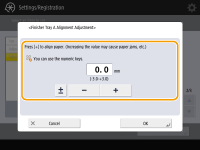
Adjust the paper output position.
3
Press <OK>.
