Problem Solving > Clearing Paper Jams > External 2/3 Hole Puncher-A1 (Optional)
*
External 2/3 Hole Puncher-A1 (Optional)

Return to Overview


If a paper jam occurs inside the External 2/3 Hole Puncher-A1, a screen prompting you to remove the jammed paper appears on the touch panel display. Check the location of the paper jam, and follow the procedure described below, and the procedure that appears on the touch panel display, to remove the jammed paper.


Remark
  • There are some areas inside the machine which are subject to high-voltages. When removing jammed paper or when inspecting the inside of the machine, do not allow necklaces, bracelets, or other metal objects to touch the inside of the machine, as this may result in burns or electrical shock.
  • When removing jammed paper, take care not to cut your hands on the edges of the paper.
  • When removing paper which has become jammed inside the machine, take care not to allow the toner on the jammed paper to come into contact with your hands or clothing, as this will dirty your hands or clothing. If they become dirty, wash them immediately with cold water. Washing them with warm water will set the toner, and make it impossible to remove the toner stains.
  • When removing paper which has become jammed inside the machine, remove the jammed paper gently to prevent the toner on the paper from scattering and getting into your eyes or mouth. If the toner gets into your eyes or mouth, wash them immediately with cold water and immediately consult a physician.
  • This procedure is only required when the External 2/3 Hole Puncher-A1 is attached to the machine.

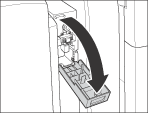
  1. Open the front cover of the external 2/3 hole puncher.

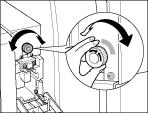
  1. Set the green knob to the fixed position.

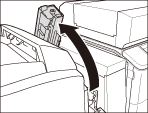
  1. Open the top cover of the external 2/3 hole puncher.

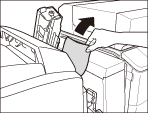
  1. Remove any jammed paper from the external 2/3 hole puncher.

  1. Close the top cover of the external 2/3 hole puncher.

  • When closing the top cover of the external 2/3 hole puncher, be careful not to get your fingers caught, as this may result in personal injury.
  1. Close the front cover of the external 2/3 hole puncher.

  • When closing the front cover of the external 2/3 hole puncher, be careful not to get your fingers caught, as this may result in personal injury.
  1. Follow the instructions on the touch panel display.
  • The screen indicating the location of the paper jam repeatedly appears on the touch panel display until the paper jam is entirely cleared. For more information, See"Screens Indicating the Locations of Paper Jams."

  • Back To Top