Problem Solving > Clearing Paper Jams > Duplex Color Image Reader Unit-A1 (Optional)

*
Duplex Color Image Reader Unit-A1 (Optional)

Return to Overview


If a paper jam occurs in the Feeder, a screen prompting you to remove the jammed paper appears on the touch panel display. Check the location of the paper jam, and follow the procedure described below, and the procedure that appears on the touch panel display, to remove the jammed originals.


Remark
  • There are some areas inside the machine which are subject to high-voltages. When removing jammed paper or when inspecting the inside of the machine, do not allow necklaces, bracelets, or other metal objects to touch the inside of the machine, as this may result in burns or electrical shock.
  • When removing jammed originals or paper, take care not to cut your hands on the edges of the originals or paper.

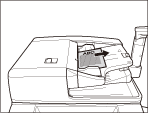
  1. Remove originals from the original supply tray.

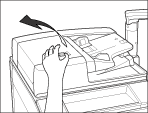
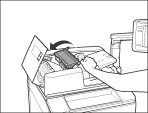
  1. Pull the lever, and open the feeder cover.

  1. Remove any jammed originals.

If there is difficulty in removing jammed paper, do not try to remove it forcibly, and proceed to step 4.

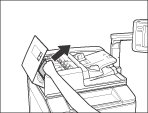
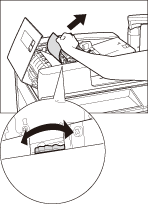
  1. Open the inner cover, holding it by its front tab.

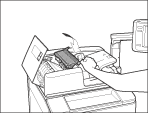
  1. Turn the green feed dial, and remove any jammed originals.

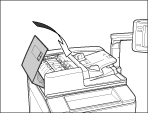
  1. Close the inner cover.

  • When closing the inner cover, be careful not to get your fingers caught, as this may result in personal injury.
  1. Close the feeder cover.

  • When closing the feeder cover, be careful not to get your fingers caught, as this may result in personal injury.
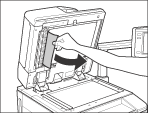
  1. Lift the feeder, and remove any jammed originals.

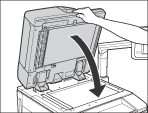
  1. Close the feeder.

  • Close the feeder gently to avoid catching your hand, as this may result in personal injury.
  • Be aware that the light emitted from the platen glass may be very bright when closing the feeder.
  1. Follow the instructions on the touch panel display.
  • The screen indicating the location of the paper jam repeatedly appears on the touch panel display until the paper jam is entirely cleared. For more information, See"Screens Indicating the Locations of Paper Jams."

  • Back To Top