Copy > Print on Tab
*
Print on Tab

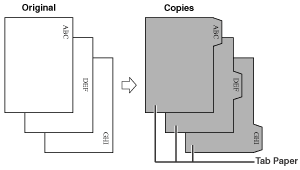
Load tab paper in the paper source, and you can copy onto the tabs using the Print on Tab mode.

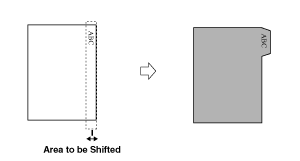
You must set how much the image on the originals must be shifted so that the image is copied onto the tabs.


Remark
  • For information on the modes which cannot be set in combination with this mode, see "Combination of Functions Chart."
  • Only LTR original can be used with the Print on Tab mode.
  • If you are feeding tab paper from a paper drawer or the Multi-drawer Paper Deck-A1, you must register the paper type in the paper source as tab paper beforehand. (See "Registering the Paper Type for the Paper Source.")
  • For instructions on loading tab paper into the paper source, see "Maintenance."
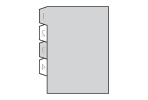
  • Paper drawer: Load the paper in reverse order and face down, with the tabs on the left side.

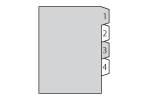
  • Multi-drawer paper deck: Load the paper in the normal order and face up, with the tabs on the right side.

  • If [Unfinished Tab Paper Forced Output] in [Function Settings] (Settings/Registration) is set to 'On', extra sheets of tab paper are output forcibly after each set is output as follows.
  • The registered number of tabs multiplied by the number of sets of copies/prints, minus the number of sheets of tab paper used for each set
    Example: If the number of tabs is set to five and seven sheets of tab paper are used for each set, the number of extra sheets of tab paper output is three. (See "Forcing to Output Excess Tab Paper.")
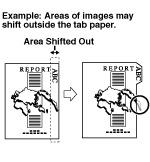
  • Areas of images shifted outside the tab paper cannot be copied on the paper, and may cause the following copies to have black streaks or appear dirty.


  1. Place your originals → press [Options] → [Print on Tab].
  1. Press [Change] → select the paper source that contains tab paper.
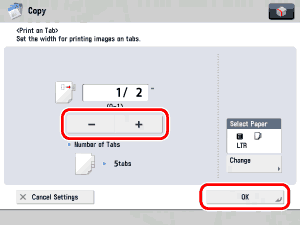
  1. Set the copy shift width (0" to 1") by pressing [-] or [+] → press [OK].

  • Make sure that the Number of Tabs shown on the Tab Paper Print Shift Width Settings screen is the same as the number of tabs on the tab paper loaded in the paper source.
  • You can change the number of tabs in [Paper Settings]. (See "Registering the Paper Type for the Paper Source.")

  • Back To Top