Select Category
Copy
Fax
Scan and Send
Scan and Store
Access Stored Files
Fax/I-Fax Inbox
Secured Print
Hold
Web Access
Scanner
Quick Menu
Status Monitor/Cancel
Print
Network
Remote UI
MEAP
Security
Software
Select Category
All
-- Copy
Using the Machine to Send/Receive a Fax
Sending a Fax from a Computer (Windows)
-- Scan and Send
-- Scan and Store
-- Access Stored Files
-- Fax/I-Fax Inbox
-- Secured Print
-- Hold
-- Web Access
-- Scanner
-- Quick Menu
-- Status Monitor/Cancel
Printing from a Computer (Windows)
Printing from a Computer (Mac)
Setting the Machine (PS/PCL/UFR II Printer)
-- Network
-- Remote UI
-- MEAP
-- Security
-- Software
-- Before You Start Using This Machine
-- How to Use This Manual
-- Basic Operations
-- Optional Products for the C9075 PRO/C9065 PRO
-- Optional Products for the C7065/C7055
-- Settings/Registration
-- Problem Solving
-- Maintenance
-- Practical Workflows
Copy
>
Adjusting the Color
> Erasing Color Balance Settings
*
Erasing Color Balance Settings
Return to Overview
Press [Options] → [Color Balance].
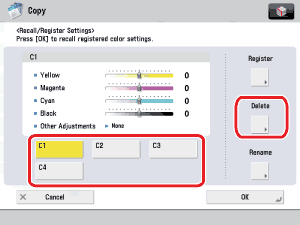
Press [Recall/Register].
Select the key containing the color balance settings that you want to erase → press [Delete].
Make sure to check the settings first before erasing them.
Press [Yes].
Key names are not erased. For instructions on changing a key name, see "
Naming a Color Balance Key
."
Press [Stop] → [OK].
Back To Top