Copy
> Making a Copy With the Express Copy Basic Features Screen
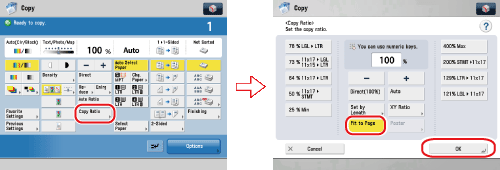
> Slightly Reducing Images to Prevent the Original Periphery from Being Trimmed (Fit to Page)

| Slightly Reducing Images to Prevent the Original Periphery from Being Trimmed (Fit to Page) |
|
For instructions on this procedure using the Regular Copy Basic Features screen, see "Fit to Page." |
|