Copy > Making a Copy With the Express Copy Basic Features Screen > Automatically Setting the Copy Ratio Based on the Original and Copy Paper Sizes (Auto Zoom)

*
Automatically Setting the Copy Ratio Based on the Original and Copy Paper Sizes (Auto Zoom)

Return to Overview


For instructions on this procedure using the Regular Copy Basic Features screen, see "Auto Zoom."


Remark
  • You cannot copy highly transparent originals, such as transparencies, in the Auto Zoom mode. Use the Preset Zoom or Zoom by Percentage modes.
  • To use the Auto Zoom mode, your originals must conform to a standard paper size: 11" × 17", LGL, LTR, LTRR, STMT, or STMTR.

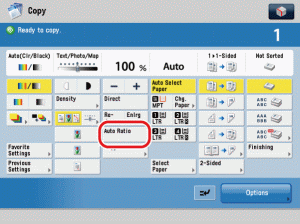
  1. Press [Auto Ratio].

  • If you set [Auto Ratio], you have to select a paper size manually. If you do not select a paper size, the copy ratio is automatically set to match the size of paper loaded in paper drawer 1.

  • Back To Top