Referring to the procedure on the display, follow the steps below to remove jammed documents.
1
Press [  ].
].
].
2
Remove the paper by pulling it gently.

If the jammed paper cannot be removed easily
Do not try to remove it forcefully but proceed to Step 3.
Close the multi-purpose tray.


4
Pull out the drawer.

5
Lower the manual feed transport guide.
|
(1)
|
Hold the tabs (A) on both sides.
|
|
(2)
|
Push them down.
|

|
IMPORTANT
|
|
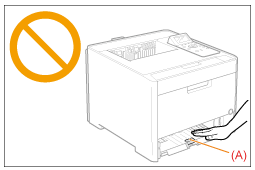
Do not touch the rubber pad (A).
Touching it may result in deterioration in print quality.
 |
Remove the paper by pulling it gently.

If the jammed paper cannot be removed easily
Do not try to remove it forcefully but proceed to Step 7.
Return the manual feed transport guide to its original position.

8
Insert the drawer in the printer.
9
When the following screen appears, press [OK].
The machine is ready to print.

 If the screen does not appear If the screen does not appearOpen or close the front cover.
|
|
NOTE
|
|
If the jammed paper cannot be removed in Step 6
See "Clearing Paper Jams (Back Cover)" and remove the jammed paper.
|
|
Next, proceed to the clearing procedure for another area which is displayed in the message.
|
