1
Press [  ] (
] ( Application).
] (Application).The "USB Direct Print Mode Screen" is displayed.
 |
When department ID management is set, the screen is displayed when the departmental ID and PIN are entered. After entering the department ID and PIN, select [<Log In>], and then press [OK].
|
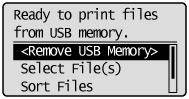
2
Select [USB Print Settings] with [ ] and [
 ], and then press [OK].
] and [], and then press [OK].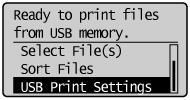
3
Select items for which to set default values using [] or [], and then press [OK].
] or [], and then press [OK].Set default print settings
|
(1)
|
Select [PDF/XPS Default Set.] or [JPEG/TIFF Def. Set.] using [
] or [], and then press [OK]. |
|
(2)
|
Set the default value of each item.
For details on the settings, see "Print Setting Menu List."
|
Setting default values for file display sorting criteria
|
(1)
|
Select [File Sort Def. Set.] with [
] and [], and then press [OK]. |
|
(2)
|
Select the default sorting criteria using [
] or [], and then press [OK]. |