Forwarding Received Documents Automatically
 |
|
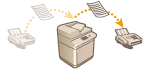
You can set to forward received documents to specified destinations. Fax numbers as well as e-mail addresses and shared folders in computers can be specified as forwarding destinations.
|
Forwarding All Documents Automatically (Forwarding All)
The machine forwards all received documents to specified destinations. This method is useful when you want to get faxes even if you are out of the office. You can also set to print forwarded documents or receive an e-mail notifying you that forwarding documents is complete.
Forwarding Automatically by Specified Conditions (Conditional Forwarding)
The machine forwards received documents that only match the specific conditions, such as sender's fax number and received dates/times. For example, you can set conditions such as forwarding documents from Company A to all branch offices and forwarding documents received on holidays to e-mail addresses. Just like with the Forwarding All method above, you can also set to print forwarded documents or receive an e-mail notifying you that forwarding documents is complete.
 |
|
To forward documents automatically, some settings such as forwarding destinations and file formats of documents need to be specified beforehand. <Forwarding Settings>
|
Configuring Forwarding Settings
To use automatic forwarding, it is necessary to specify the forwarding destination and file format, etc., in advance.
1
Press  <Function Settings>
  <Receive/Forward> <Common Settings> <Forwarding Settings>.
<Function Settings> <Receive/Forward> <Common Settings> <Forwarding Settings>.2
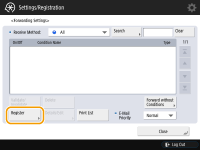
Press <Register>.
3
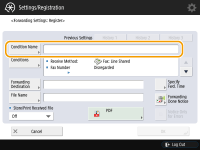
Press <Condition Name> and enter the name.
4
Press <Conditions> and specify the conditions for the destinations to forward.
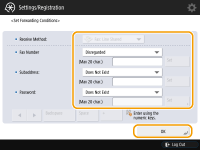
A document will be forwarded if it is received from a destination that meets the conditions specified here.
Example: Forwarding a fax from 1111111111
Receive Method: <Fax: Line Shared>
Fax Number: Select <Equals> from the drop-down list and enter "1111111111."
 |
|
If you have added lines, you can also specify a particular line. In this case, select <Fax: Line 1>, etc. for <Receive Method>.
|
5
Press <Forwarding Destination> and specify the destination to forward to.
Received documents are forwarded to the destination specified here.
6
Press <OK>.
7
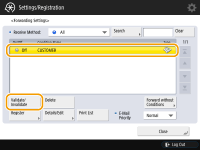
Select the specified forwarding settings and press <Validate/Invalidate> to switch the forwarding conditions to <On>.
|
|
|
If the selected destination is a group address which contains a Mail Box, the received document will not be forwarded to (and stored in) that Mail Box.
You cannot specify a WebDAV server as an I-fax forwarding destination.
If you specify a destination for which <Confirm Before Sending> is enabled as a forwarding destination, the screen to enter the password does not appear. The registered password is used and forwarding is performed. <Confirm Before Sending When Fax Dest. Included>
|
 |
|
Selecting <Forward without Conditions> enables you to forward all received documents that do not meet the specified conditions to the desired destination.
You can forward to multiple destinations by specifying a group destination in <Forwarding Destination>.
|