Registering a Personal Button/Shared Button
The number of Personal and Shared buttons that can be registered is as follows:
Personal button: Each user can register a maximum of 8 buttons (maximum total of 1,600 buttons per machine)
Shared button: A maximum of 8 buttons per machine
1.
Select the store location to register.
2.
Press

.
3.
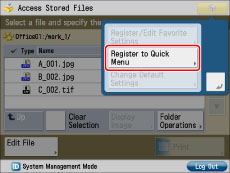
Press [Register to Quick Menu].
4.
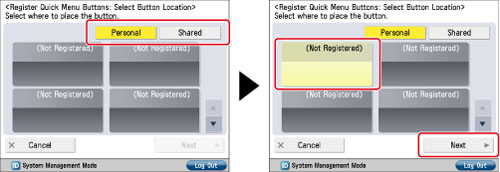
Select [Personal] or [Shared] → select the button you want to register → press [Next].
5.
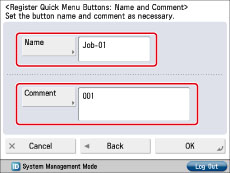
Enter a button name and comment.
Press [Name] → enter a name → press [OK].
Press [Comment] → enter a comment → press [OK].
6.
Press [OK] → [Close].
If you want to change the name or comment, press [Rename].
|
NOTE
|
|
The number of Personal buttons that can be registered may be fewer than the maximum, depending on the memory usage of the Quick Menu function.
If authentication is not set, the Personal buttons are not displayed.
|