



| Configuring a Shared Folder (Windows 2000/XP/Server 2003/Vista) (LASER CLASS 830i Only) |
| Remark |
|
|
|||||
|
For Windows Vista: For Windows 2000: For Windows XP: For Windows Server 2003: |
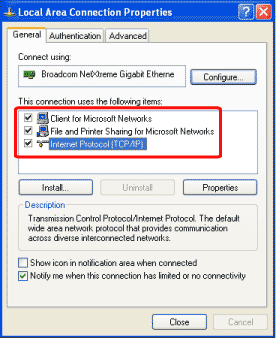
For Windows Vista For Windows 2000/XP/Server 2003 |
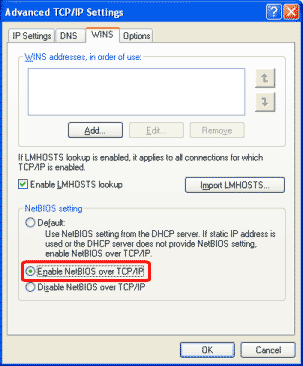
For Windows Vista: For Windows 2000: For Windows XP/Server 2003:
|
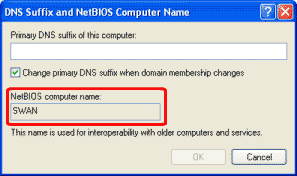
For Windows XP Home Edition, skip step 7.
For Windows Vista: For Windows 2000: For Windows XP/Server 2003: |
Under [System Tools], double-click [Local Users and Groups] → right-click the [Users] folder → click [New User].
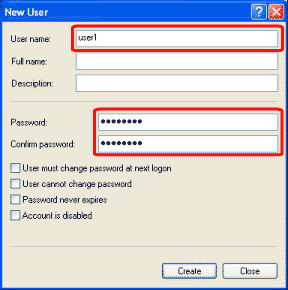
In the [New User] dialog box, enter the user name in [User name] → enter the password in [Password] → re-enter the password in [Confirm password].
Enter a user name not longer than 20 alphanumeric characters, and a password not longer than 14 alphanumeric characters. If [User must change password at next logon] is selected, any new users added must change their passwords in order to send data from the machine. (You cannot change the password from the operation panel.) |
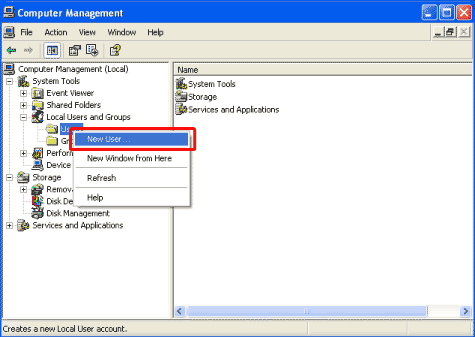
For Windows Vista: For Windows 2000/XP/Server 2003: |
|
|
|
|
|
|
|
|
|
Sample destination setting: Server side settings:
Create a folder called Images within share, and then specify Images as the destination for sending. The machine's destination settings:
|