 |
|
|
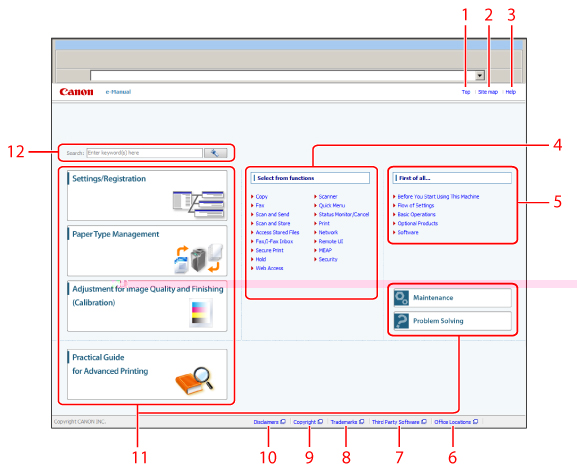
1.
|
Top
The top page of the e-Manual is displayed. |
|
2.
|
Site map
The site map of the e-Manual is displayed. |
|
3.
|
Help
The usage of the e-Manual is displayed.
|
|
4.
|
Select from functions
The instructions of each function and operation method are described.
|
|
5.
|
First of all…
This section describes the required information to use the machine, and the information of optional product and software. |
|
6.
|
Office Locations
Inquiries for the machine are displayed. |
|
7.
|
Third Party Software
The information about the third party software is displayed. |
|
8.
|
Trademarks
The trademarks are displayed. |
|
9.
|
Copyright
The information of copyrights is displayed. |
|
10.
|
Disclaimers
The disclaimers are displayed. |
|
11.
|
Managing and configuring the machine
This section describes how to solve a problem or maintenance method, and manage or configure the machine. |
|
12.
|
Enter keyword(s) here
Enter a key word in the search dialog box, and press  . The search results page is displayed. . The search results page is displayed. |
