You can make prints by selecting the look of the image with just one touch of a key. The following four options are available.
This setting enables you to make prints with lighter color tones by decreasing the density, while maintaining a good balance throughout.
This setting enables you to make prints with heavier color tones by increasing the density, while maintaining a good balance throughout.
This setting enables you to make prints by reproducing the highlighted areas that normally tend to appear as white more faithfully. This is achieved by increasing the density of areas that have a low density.
This setting enables you to make prints that look like old-fashioned photographs.
|
IMPORTANT
|
|
This mode can be used only for printing a file stored in a mail box.
|
1.
Press

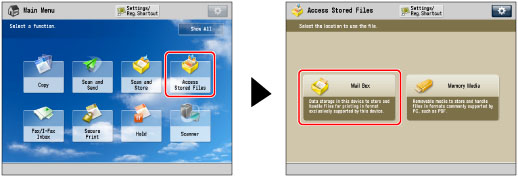
(Main Menu) → [Access Stored Files] → [Mail Box].
2.
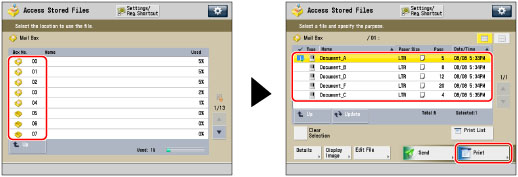
Select the desired Mail Box → select the desired file → press [Print].
3.
Press [Change Print Settings].
4.
Press [Options] → [Adjust One-Touch Color].
5.
Select the desired Adjust One-Touch Color feature → press [OK].
You can combine different Adjust One-Touch Color features, but the following cannot be selected together:
[Lighten Image] and [Darken Image] and [Highlight Reproduction]
|
NOTE
|
|
If you select [Sepia Tone], [Single Color] is displayed on the Change Print Settings screen.
|
6.
Press [Close].
|
IMPORTANT
|
|
Adjust One-Touch Color mode settings are actually preset color balance settings. Therefore, if you change the Adjust One-Touch Color mode settings, any color balance settings that you may have made are also changed.
You cannot set the Sepia Tone mode to files in a mail box that have been received from a computer. If you press [Start Printing] with the Sepia Tone mode set, a message prompting you to reset the settings appears on the screen.
You cannot specify Adjust One-Touch Color mode settings when you print a CMYK format file stored in a mail box.
|