Overview
Print Services Client is client software for Canon Business Imaging Online that is installed in MEAP-compatible Canon devices.
Job Management Function
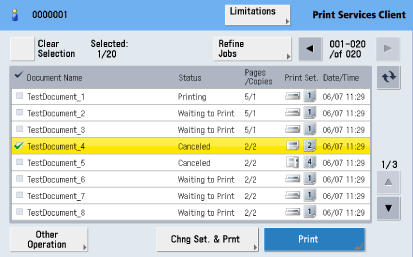
This software enables you to print, cancel printing, or delete jobs stored in Canon Business Imaging Online from the touch panel display of a Canon device.
NOTE
The screen that is displayed may differ depending on the model of the machine.
The job management function can only be used on Canon devices with a touch panel display.
Auto Batch Printing Function
By setting the Auto Batch Printing function in Print Services Client, Auto Batch Printing jobs stored in Canon Business Imaging Online can be automatically and periodically printed.
System Requirements
The system requirements for Print Services Client are as follows.
Supported Models
For information on the devices that support the operation of this application, see "Canon Homepage."
IMPORTANT
Print Services Client uses the port below. Confirm that the port is enabled on the device.
Function
Use
Protocol
Port Number
HTTP/HTTPS Receive
Change Settings Function
TCP
8000/8443
Enable the Auto Clear setting of the device when using the Print Services Client. For more information, see the manual accompanying your device.
Supported Web Browsers
Windows Internet Explorer 7.0
Windows Internet Explorer 8.0
Windows Internet Explorer 9.0
Windows Internet Explorer 10.0
Linked Software
Canon Business Imaging Online
PullPrint Service Provider Version 1.0
Access Token Provider Version 1.0
IMPORTANT
PullPrint Service Provider and Access Token Provider must be running in the same MEAP environment as Print Services Client.
For information on the MEAP resources supported by Print Services Client, see "MEAP Resource Use"
Supported Languages
English (Default)
Japanese
NOTE
If you specify a language that is not supported, the default language (English) is displayed.
System Configuration
Print Services Client System
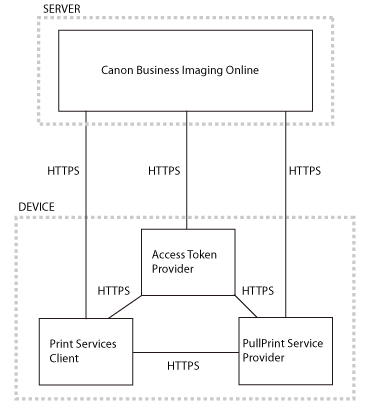
The Print Services Client system configuration is shown below.
NOTE
For information on the connection settings, see Chapter 5, "Change Settings Function"
You can connect Print Services Client and Canon Business Imaging Online via a proxy server. Print Services Client supports the proxy authentication methods below.
Basic Authentication
Digest Authentication
» Chapter 1 Overview » Overview