
Deleting User Setting Information
You can delete unnecessary user setting information. User setting information is a type of table that includes data about where and what settings have been configured for users. Setting information is registered automatically, and some setting information must be manually deleted because it remains even after a user has been deleted. To delete user setting information, log in to the Remote UI with Administrator privileges. Note, however, that it may not be possible to delete setting information for the user who is using a MEAP application.
|
|
|
You can also set to automatically delete user setting information when the maximum amount of information that can be registered has been reached. <Action When Maximum Number of Users Exceeded>
For information on the maximum amount of user setting information that can be registered, see Specifications.
|
1
Start the Remote UI. Starting the Remote UI
2
Click [User Setting Information Management Service] on the portal page. Remote UI Screen
3
Delete the user setting information.
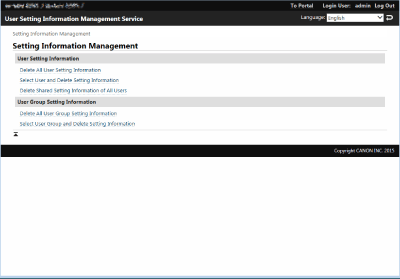
 Deleting the setting information for all users
Click [Delete All User Setting Information]  [Yes].
[Yes].Deleting the setting information for individual users
|
1
|
Click [Select User and Delete Setting Information].
|
|
2
|
Select the check box for the user with the setting information that you want to delete, and click [Delete]
[Yes]. |
Deleting the shared setting information of all users
Click [Delete Shared Setting Information of All Users] [Yes].
[Yes].Deleting the setting information for all user groups
Click [Delete All User Group Setting Information] [Yes].
[Yes].Deleting the setting information for individual user groups
|
1
|
Click [Select User Group and Delete Setting Information].
|
|
2
|
Select the check box for the user group with the setting information that you want to delete, and click [Delete]
[Yes]. |