Problem Solving > Service Call Message > Contacting Your Local Authorized Canon Dealer

*
Contacting Your Local Authorized Canon Dealer

Return to Overview


If a screen prompting you to contact your local authorized Canon dealer is displayed, follow the procedure described below.


Remark
  • Do not connect or disconnect the power cord with wet hands, as this may result in electrical shock.
  • Always grasp the power plug when disconnecting the power cord. Pulling on the power cord may expose or snap the core wire, or otherwise damage the power cord. If the power cord is damaged, this could cause current to leak, resulting in a fire or electrical shock.
  • If you turn OFF the main power switch when there is a job waiting to print, that job is erased.

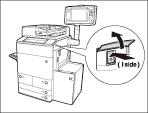
  1. Press the main power switch to the "" side.

When operating the main power switch, open the main power switch cover.

  1. Wait at least 10 seconds after the main power indicator is turned off, and then turn the main power switch back to "I" side.

When operating the main power switch, open the main power switch cover.

  1. If the machine still does not operate normally, follow the procedure below, and then contact your local authorized Canon dealer.
  • Turn the main power switch OFF.
  • Remove the power plug from the power outlet.
  • When you contact your local authorized Canon dealer, have the following information available:
  • Product name
  • Details of the malfunction
  • The error code displayed on the touch panel display

  • Back To Top