Security > User Setting Information Management Service > Deleting the User Setting Information

*
Deleting the User Setting Information

Return to Overview


You can delete password information for users or information of the buttons on Quick Menu. You can also delete the shared setting information of all users, as well as specific user setting information.


Remark
  • You cannot delete the user setting information for the user logged in as an administrator.

  1. Select the method to delete the User Setting Information from the User Setting Information Management Service page.

  • If you want to delete all users' setting information:
  • If you want to select and delete specified user setting information:
  • If you want to delete the shared setting information of all users:

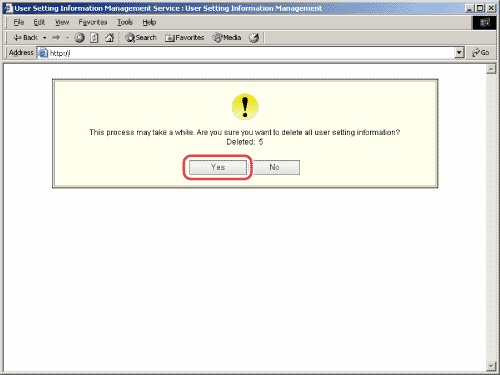
  • If you want to delete all users' setting information:
  • Click [Delete All User Setting Information].
  • Click [Yes].

The User Setting Information for all users is deleted.

The changed User Setting Information is enabled when the machine is restarted.


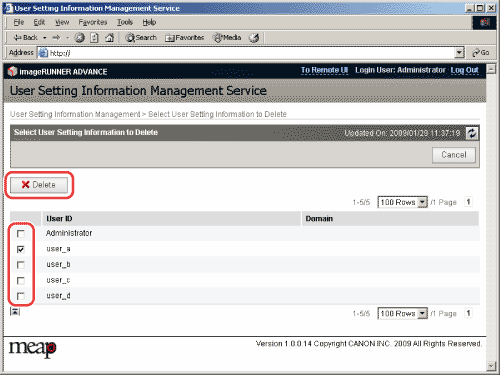
  • If you want to select and delete specified user setting information:
  • Click [Select User Setting Information to Delete].
  • Select the user information to delete → click [Delete].

  • Press [Yes].

The selected User Setting Information is deleted.

The changed User Setting Information is enabled when the machine is restarted.


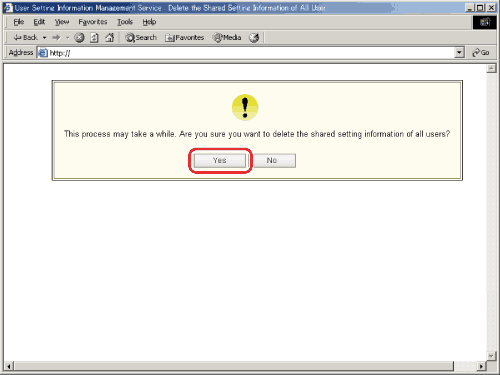
  • If you want to delete the shared setting information of all users:
  • Click [Delete the Shared Setting Information of All Users].
  • Click [Yes].

The shared setting information of all users is deleted.

The changed user setting information is enabled when the machine is restarted.


  • Back To Top