





Print
> Setting the Machine (PS/PCL/UFR II Printer)
> PCL Settings
> Enlarge A4 Print Width

| Enlarge A4 Print Width |
|
This setting determines whether to expand the printable area of A4 size paper to that of Letter size in width. If [On] is selected, all the area on a page 1/6" from the top and bottom edges and 1/8" from the left and right edges is available for printing on A4 paper. Only the width increases. If [Off] is selected, all the area on a page 1/6" from the top, bottom, left, and right edges is available for printing on A4 paper.
|
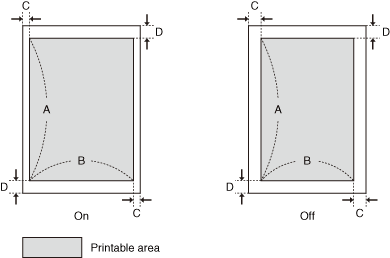
| Settings | On | Off |
| A: Length | 11 1/3" | |
| B: Width | 8" | 7 7/8" |
| C: Left and right edges | 1/8" | 1/6" |
| D: Top and bottom edges | 1/6" | |
| Remark |
|
|
|||||