Print
> Setting the Machine (PS/PCL/UFR II Printer)
> UFR II Settings
> Gray Compensation

| Gray Compensation |
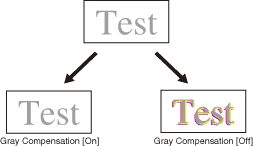
This setting determines whether only black (K) toner is used. Settings can be applied separately for text, graphics, and image data. If [On] is selected, black and gray data is printed using the black (K) toner only, which lessens toner bleeding. If [Off] is selected, black and gray data is printed using all four (CMYK) toners. Gradation reproducibility of dark areas improves in comparison to [On].
|