Print > Setting the Machine (PS/PCL/UFR II Printer) > Checking and Changing Print Jobs > Canceling Print Jobs > Handling Jobs from the Secured Print Screen

*
Handling Jobs from the Secured Print Screen

Return to Overview


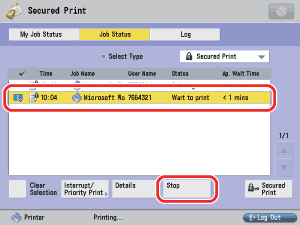
To cancel jobs from the Secured Print screen, follow the steps below.


  1. Press either [My Job Status] or [Job Status].

  1. Select the job to be canceled → press [Stop].


  • To cancel multiple jobs, select jobs displayed in the list in the order to be canceled → press [Stop].
  • To cancel all jobs, press [Select All] → press [Stop].
  1. Press [Yes].

If you do not want to cancel, press [No].

  • You cannot cancel other users' jobs. However, if you are logged in as an Administrator, you can cancel the other users' jobs.
  • <NG> is displayed in the print job log screen for canceled print jobs.

  • Back To Top