






| Printing With a Printer Driver |
|
Normally, the series of operations involved in printing data from a computer is specified by control commands generated using a printer driver. Control commands are a command system for controlling a printer. For example, when printing using a printer driver, control commands print data according to the following flow.
|
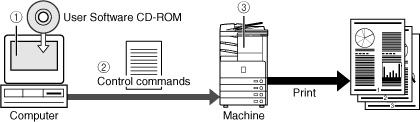
| <1> | Using a printer driver, data to be printed is converted to control commands. |
| <2> | Control command data is sent to the machine. |
| <3> | Following the received control commands, the machine processes and prints the data. |
| Remark |
|
||||||
|
This machine supports the following three kinds of control commands:
UFR (Ultra Fast Rendering) is printing technology developed by Canon. High-speed printing is made possible by sharing the processing of print data normally done by the machine with the computer.
PCL (Print Control Language), developed by Hewlett-Packard, is a command system for controlling page printers. Command versions supported by this machine are PCL5e and PCL6.
PS (PostScript), developed by Adobe, is a command system for controlling page printers.
|