Details of each item are shown below.
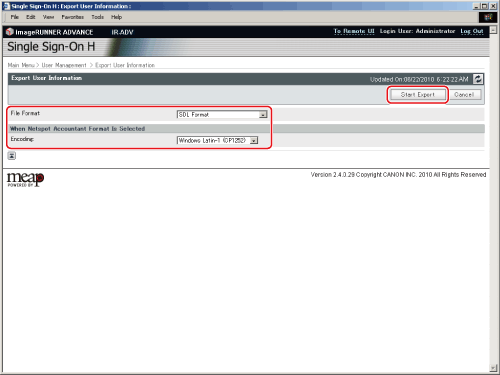
| [File Format]: |
Specify the file format for exporting. |
| SDL Format |
Export the user data in the file format used for SDL and the Local Device Authentication of SSO-H. (File extension: "ldif"). |
| NetSpot Accountant 3.x Format |
Export the user data created in NetSpot Accountant 3.x Format. (File extension: "csv"). |
| NetSpot Accountant 4.x Format |
Export the user data created in NetSpot Accountant 4.x/imageWARE Accounting Manager Format. (File extension: "csv"). |
| <When Netspot Accountant Format Is Selected> |
| [Encoding]: |
Specify the character code for file exporting. |
| Windows Latin-1 (CP1252) |
Export the file written in Windows Latin Format.
Windows Latin is a character code for European. |
| Windows Japanese (CP932) |
Export the file written in Windows Japanese Format.
Windows Japanese is a character code for Japanese. |