MEAP > Menu for General Users > Changing a Local Device Authentication General User's Password

*
Changing a Local Device Authentication General User's Password

Return to Overview


An general user for the Local Device Authentication can change their own password.
This increases the security of private information. The System Administrator (Administrator) should notify general users that they can change their own password.


  1. Open your web browser.
  1. Enter the following URL in the address bar.

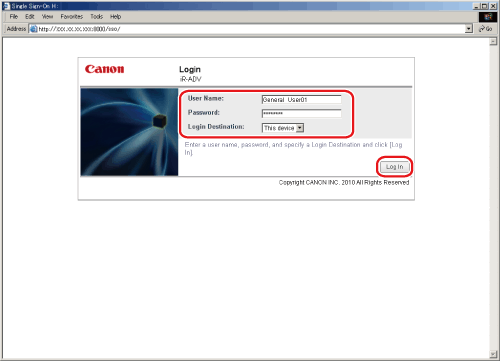
http://<IP address or host name of the machine>:8000/sso/

The [Login] page is displayed.

  1. Enter the user name and password of a user registered as a user for the Local Device Authentication System of SSO-H → select [This device] as the login destination → click [Log In].

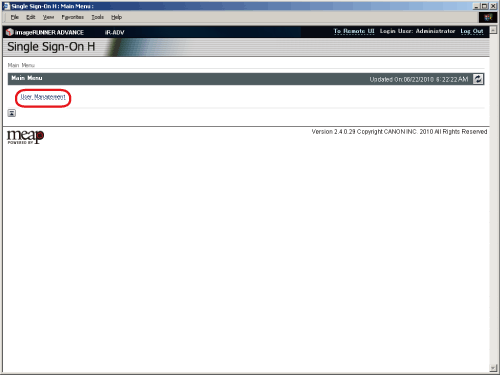
The [Main Menu] page is displayed.

  1. Click [User Management].

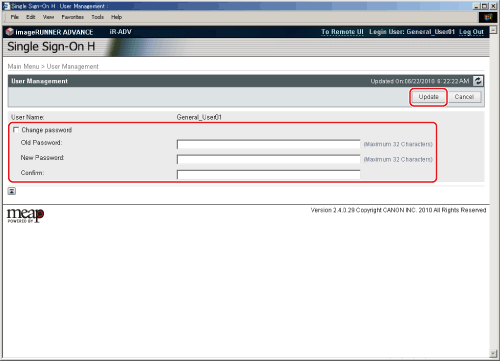
  1. Select [Change password] → enter the appropriate passwords → click [Update].

  1. Click [Log Out] to finish the operation.

  • Back To Top