MEAP > Logging in to SSO-H > Logging in from the Remote UI Portal

*
Logging in from the Remote UI Portal

Return to Overview


Remark
  • To log in from the Remote UI Portal, set [Remote UI] in [License/Other] in [Management Settings] (Settings/Registration) to 'On'. (See "Remote UI.")

  1. Open your web browser.
  1. Enter the following URL in the address bar.

http://<IP address or host name of the machine>/

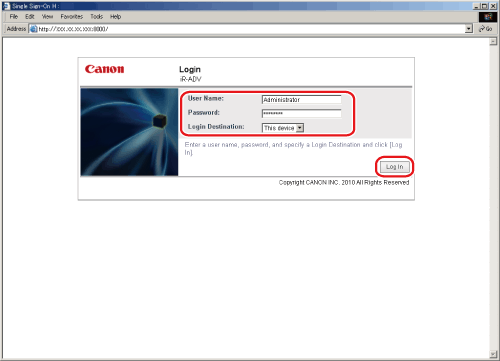
The [Login] page is displayed.

  • If you entered <http://<IP address or host name of the machine>:8000/sso/>, you will log in to the main menu without displaying the Remote UI screen in step 4.
  1. Enter/select each item, and click [Log In].

  • If logging in as a Local Device Authentication administrator:
  • If logging in as a Domain Authentication administrator:
  • If logging in as a general user:

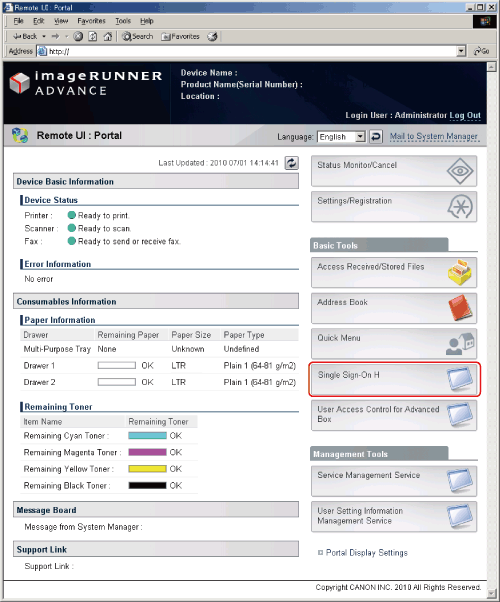
You are logged in to the Remote UI.


  • If logging in as a Local Device Authentication administrator:
  • Select [This device] in [Login Destination], and enter the user name and password of the Local Authentication administrator in [User Name] and [Password].

  • If logging in as a Domain Authentication administrator:
  • Select the domain name in [Login Destination], and enter the user name and password of the domain authentication administrator in [User Name] and [Password] on the authentication server of the selected domain.

  • If logging in as a general user:
  • Select [This device] in [Login Destination] → enter the user name and password of a general user in [User Name] and [Password].

  1. On the top page of the Remote UI, click [Single Sign-On H].

When logging in as a Local Device Authentication administrator or a Domain Authentication administrator, you will log in to the management application.

When logging in as a general user, you will log in to the general user application for SSO-H.

  1. When you have finished, click [Log Out].
  • If you are logged in as the System Administrator (Administrator), make sure you log out before closing SSO-H. If you close the Web browser without logging out, SSO-H cannot be used for a while, even if you log in again as the System Administrator (Administrator).

  • Back To Top