MEAP > Before Starting SMS (Preparations) > Activating Use HTTP in MEAP Settings

*
Activating Use HTTP in MEAP Settings

Return to Overview


Use the control panel of the machine to set MEAP functions from your web browser.


Remark
  • By setting [Use HTTP] to 'On', you can open a necessary port. However, it is recommended that it is set to 'Off', if a port is not used. If you leave the port open, an unauthorized user may access the machine.
  • The default setting is 'On'.

  1. Press (Settings/Registration) → [Preferences].
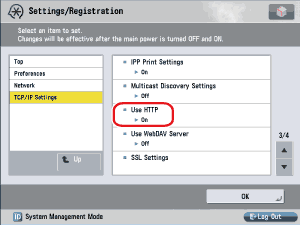
  1. Press [Network] → [TCP/IP Settings] → [Use HTTP].

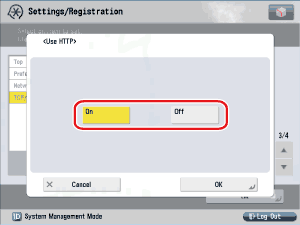
  1. Press [On].

[On]: HTTP server is used.

[Off]: HTTP server is not used.

  1. Press [OK].

The selected mode is set.

  1. Turn the main power of the machine OFF, wait 10 seconds, and then turn the power ON.
  • The [Use HTTP] setting is activated only after you restart the machine (the main power switch is turned OFF, and then back ON). For instructions on turning the power ON/OFF, see "Before You Start Using This Machine."

  • Back To Top