Before You Start Using This Machine
> Main Power and Control Panel Power
> Shutting Down the Machine

| Shutting Down the Machine |
|
This section explains how to turn OFF the main power. If there are any jobs currently being processed, or a MEAP application is running when the Shutdown mode is activated, the machine asks you to confirm and cancel any existing jobs, and then access to the hard disk is restricted. This procedure protects the hard disk from access errors the next time the machine is turned ON. When the machine shuts down, it also performs an internal cooling down process, which enables the machine to be shut down safely. |
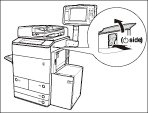
When operating the main power switch, open the main power switch cover.
|
 " side.