Before You Start Using This Machine > Parts and Their Functions > Internal View

*
Internal View

Return to Overview


The Duplex Color Image Reader Unit-A1 and Copy Tray-P1 are attached.


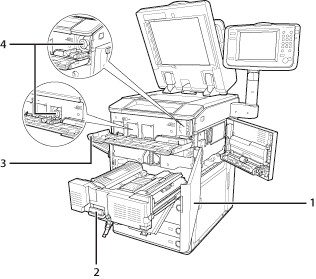
1 Front Cover
Open this cover to clear a paper jam in the fixing transport unit. (See "Problem Solving.")
2 Fixing Transport Unit
Pull the fixing transport unit out to clear a paper jam. (See "Problem Solving.")
3 Toner Replacement Cover
Open this cover to replace the toner cartridge.
4 Toner Cartridge
When toner runs out, pull out the toner cartridge, and replace it with a new one. Toner cartridges are sold separately (not standard equipment). (See "Maintenance.")

  • Back To Top