| 1 |
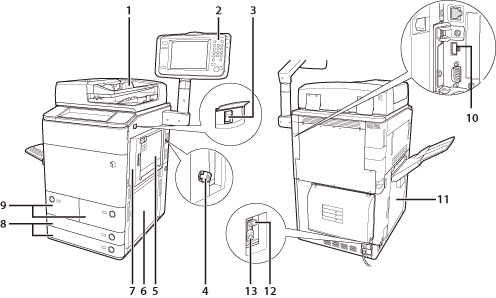
Feeder (Optional)
Originals placed in the feeder are fed one sheet at a time to the platen glass for scanning. |
2 |
Control Panel
Includes the keys, touch panel display, and indicators required for operating the machine. (See "Control Panel Parts and Functions.")
|
| 3 |
Main Power Switch
Press to the "I" side to turn the power ON. (See "Main Power and Control Panel Power.") |
4 |
Security Key (Optional)
For managing the use of the machine and preventing unauthorized copies. |
| 5 |
Multi-Purpose Tray
Use the multi-purpose tray to feed paper manually, and for loading nonstandard paper stock, such as envelopes. (See "Basic Operations.") |
6 |
Main Unit's Lower Right Cover
Open this cover when cleaning a paper jam inside the main unit.
|
| 7 |
Main Unit's Upper Right Cover
Open this cover when cleaning a paper jam inside the main unit.
|
8 |
Paper Drawer 3, 4
Holds up to 550 sheets of paper (20 lb bond (80g/m2) ). |
| 9 |
Paper Drawer (Right/Left)
Holds up to 1100 sheets of paper (20 lb bond (80g/m2) ). |
10 |
USB Port
Use the USB port to connect external hard disks and other devices to the machine. |
| 11 |
Left Cover
Open this cover when cleaning a paper jam inside the main unit. (See "Problem Solving.") |
12 |
Breaker
Detects excess current or leakage current. (See "Getting Started.")
|
| 13 |
Test Button
Press this button to periodically test the circuit breaker. (See "Getting Started.") |
 |
|