| Provide Adequate Installation Space |
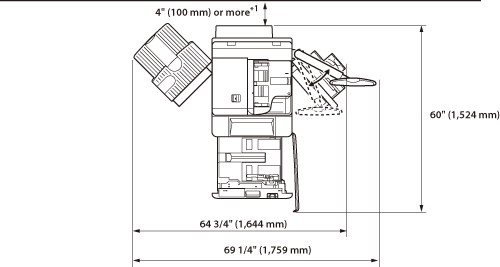
Copy Tray-P1 and Duplex Color Image Reader Unit-A1 are attached.
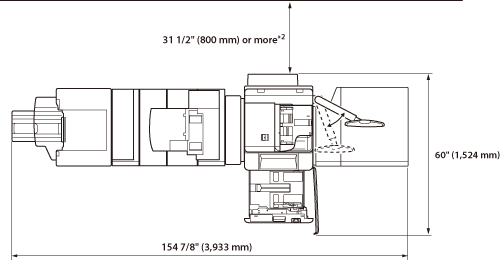
*1 Make sure to provide at least 31 2/1" (800 mm) of space if you install one or more of the following: Paper Folding Unit-G1, Professional Puncher-C1, Document Insertion Unit-H1, or Multi-drawer Paper Deck-A1. The Booklet Finisher-A1, Paper Folding Unit-G1, Professional Puncher Integration Unit-B1, Professional Puncher-C1, Document Insertion Unit-H1, Buffer Pass Unit-F1, Duplex Color Image Reader Unit-A1, and Multi-drawer Paper Deck-A1 are attached.
*2 Make sure to provide at least 4" (100 mm) of space if none of the Paper Folding Unit-G1, Professional Puncher-C1, Document Insertion Unit-H1, or Multi-drawer Paper Deck-A1 is installed.
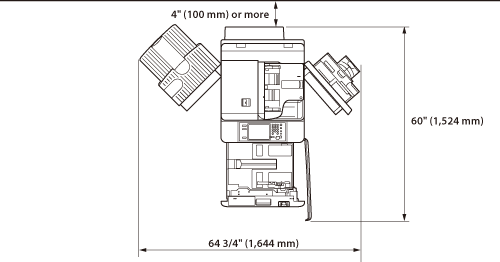
Copy Tray-P1 and Duplex Color Image Reader Unit-A1 are attached.
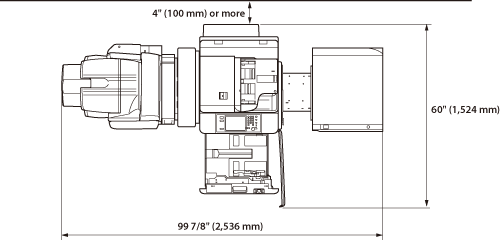
The Booklet Finisher-B1, External 2/3 Hole Puncher-A1, Buffer Pass Unit-F1, Duplex Color Image Reader Unit-A1, and POD Deck Lite-A1 are attached.
|