- Connect the plug of the imageRUNNER ADVANCE C9075 PRO/C9065 PRO to an outlet that is 208 V AC 15 A or greater. Connect the plug of the imageRUNNER ADVANCE C7065/C7055 to an outlet that is 120 V AC 20 A or greater.
- Make sure that the power supply for the machine is safe, and has a steady voltage.
- Do not connect other electrical equipment to the same power outlet to which the machine is connected.
- Do not connect the power cord to a multiplug power strip, as this may cause a fire or electrical shock.
- The power cord may become damaged if it is stepped on, affixed with staples, or if heavy objects are placed on it. Continued use of a damaged power cord can lead to an accident, such as a fire or electrical shock.
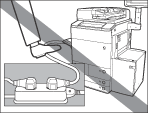
- The power cord should not be taut, as this may lead to a loose connection and cause overheating, which could result in a fire.
- If excessive stress is applied to the connection part of the power cord, it may damage the power cord or the wires inside the machine may disconnect. This could result in a fire. Avoid the following situations:
- Connecting and disconnecting the power cord frequently.
- Tripping over the power cord.
- The power cord is bent near the connection part, and continuous stress is being applied to the power outlet or the connection part.
- Applying excessive force on the power plug.
|






