How to Use This Manual > e-Manual > e-Manual Topics

*
e-Manual Topics

Return to Overview


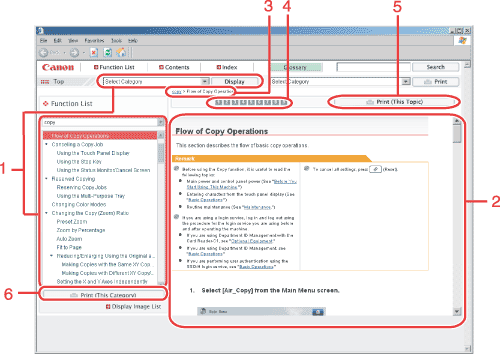
The explanatory pages under each category in the e-Manual are called "topics." They are displayed in a screen similar to the one below.


1 Display Image List/Display Function List
Click to switch the content displayed in the left panel.
2 Topic Page
Describes how to use the machine, etc..
3 Breadcrumb List
Displays the path to the current topic. Click to jump to a higher level.
4 Step Anchors
These are links to the various steps inside the topic. Click them to jump to the various steps.
5 Print (This Topic)
Click to print the currently displayed topic page.
6 Print (This Category)
Click to print the currently displayed category.

  • Back To Top