Copy > Area Designation > Using the Numeric Keys
*
Using the Numeric Keys

Return to Overview


Remark
  • For instructions on entering values in inches, see "Basic Operations."

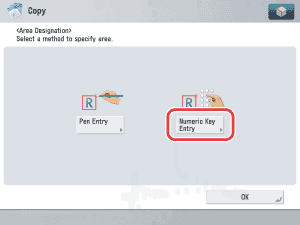
  1. Place your originals → press [Options] → [Area Designation].
  1. Press [Numeric Key Entry].

  • Before performing the next step, you must manually measure the size and position of the area that you want to designate on the original.
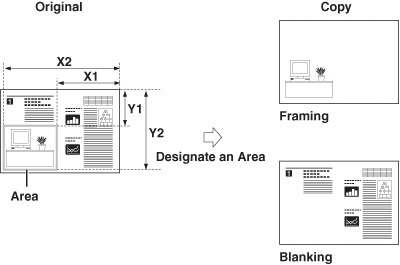
  • When you measure the XY values, always start measuring from the image out to the right side edge of the original, and up to the top of the original. These measurements tell the machine the desired framed area's size and position.
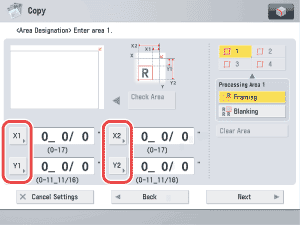
  1. Press [X1], [X2], [Y1], and [Y2] → use - (numeric keys).

[X1]: The distance of the area's right border to the original's right edge.
[X2]: The distance of the area's left border to the original's right edge.
[Y1]: The distance of the area's top border to the original's top edge.
[Y2]: The distance of the area's bottom border to the original's top edge.

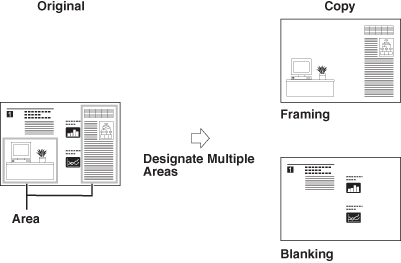
You can designate up to four areas.

  • To change a value you entered, press [X1], [X2], [Y1], or [Y2] → enter the correct value using - (numeric keys).
  • To check the designated area, press [Check Area].
  1. Select [Framing] or [Blanking].

Details of each item are shown below.

[Framing]: Copy only the contents of the designated area while discarding the rest of the original.
[Blanking]: Copy the original by blanking out the contents of the designated area.
  • To continue designating other areas, press an area key → repeat step 3.
  • To redesignate an area, select the area by pressing the appropriate area key.
  • To clear a designated area, select the area by pressing the appropriate area key → press [Clear Area].
  • If you want to use different settings for different areas, select the area by pressing the appropriate area key → select [Framing] or [Blanking].
  1. Press [Next] → select [Shift center] or [Do not shift center].

If only [Blanking] is selected, this step is unnecessary. Skip to step 6.

  • If the Center Shift mode is already specified beforehand, the Center Shift Settings screen does not appear.
  • Center Shift settings specified within the Area Designation mode are deleted when the area settings are canceled.
  1. Press [OK].

  • Back To Top