|
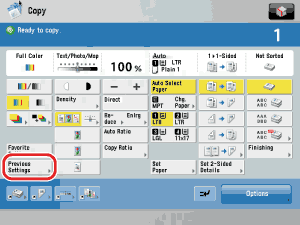
- One copy job is defined by setting the number of copies, exposure, zoom, etc., and by pressing the control panel power switch,
 (Start) or (Start) or  (Reset), when the Auto Reset function is 'On', or by calling up a copy job stored in memory. If one of these keys was not pressed, or if the Auto Reset function is not active, calling up a copy job by pressing [Recent Settings] is not possible. (Reset), when the Auto Reset function is 'On', or by calling up a copy job stored in memory. If one of these keys was not pressed, or if the Auto Reset function is not active, calling up a copy job by pressing [Recent Settings] is not possible.
- You cannot recall the Merge Job Blocks mode.
|
|
|
|
- The Standard mode cannot be recalled or stored.
- Identical copy modes that are stored, are counted as one setting.
|
|