





Copy
> Making a Copy With the Express Copy Basic Features Screen
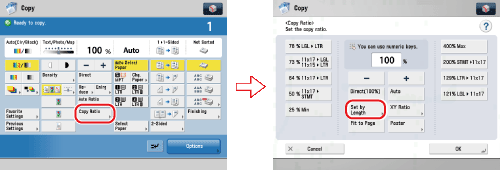
> Calculating the Copy Ratio Based on the Original and Copy Paper Sizes (Set Ratio by Length)

| Calculating the Copy Ratio Based on the Original and Copy Paper Sizes (Set Ratio by Length) |
|
For instructions on this procedure using the Regular Copy Basic Features screen, see "Reducing/Enlarging Using the Original and Copy Sizes." |
| Remark |
|
||||||
|
|
|
|
If the zoom ratio is less than 25%, a message appears telling you that the ratio will be adjusted to 25%. If it is more than 400%, a message appears telling you that the ratio will be adjusted to 400%. |
|
|
|
|
If the zoom ratio is less than 25%, a message appears telling you that the ratio will be adjusted to 25%. If it is more than 400%, a message appears telling you that the ratio will be adjusted to 400%. |